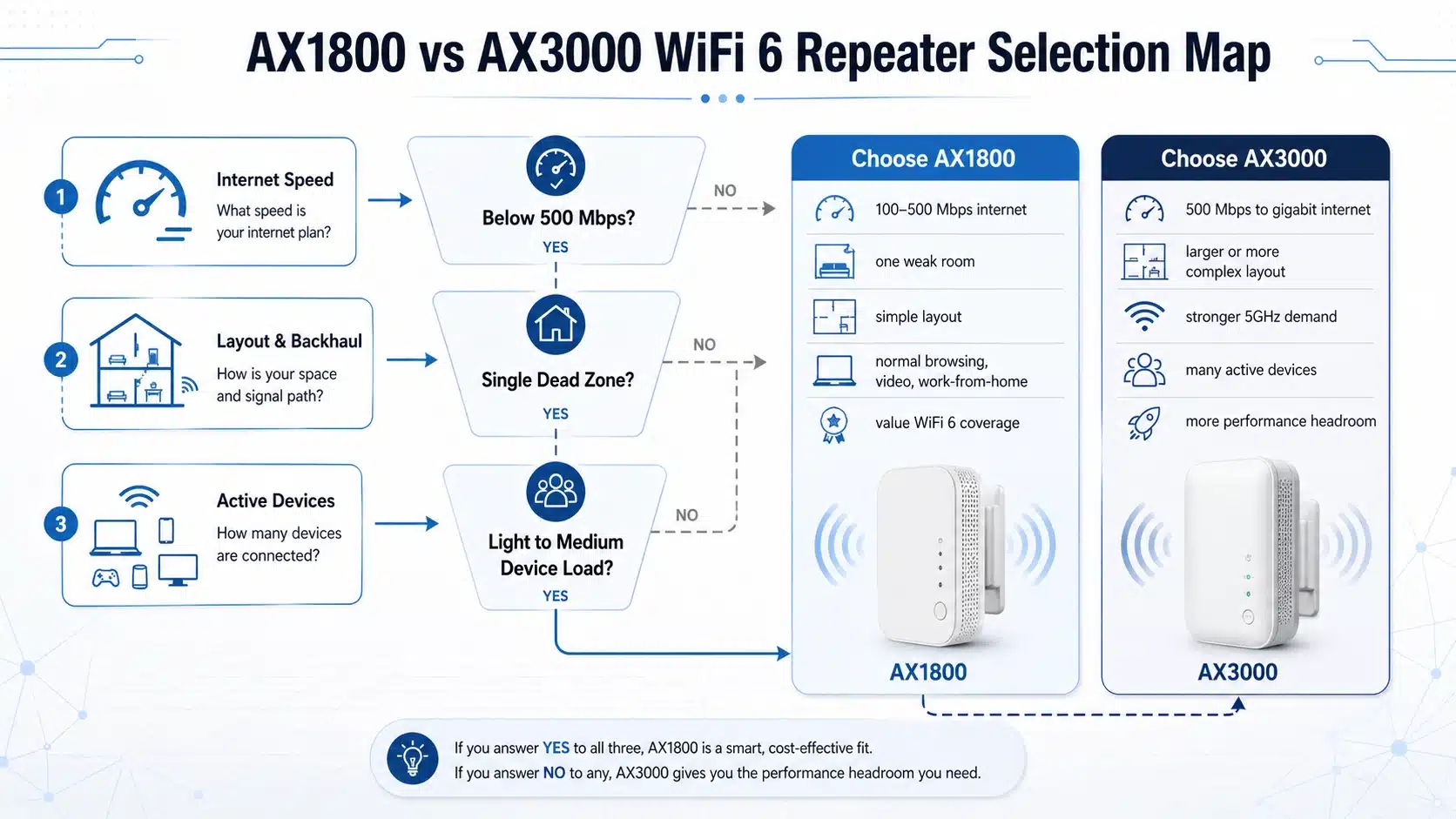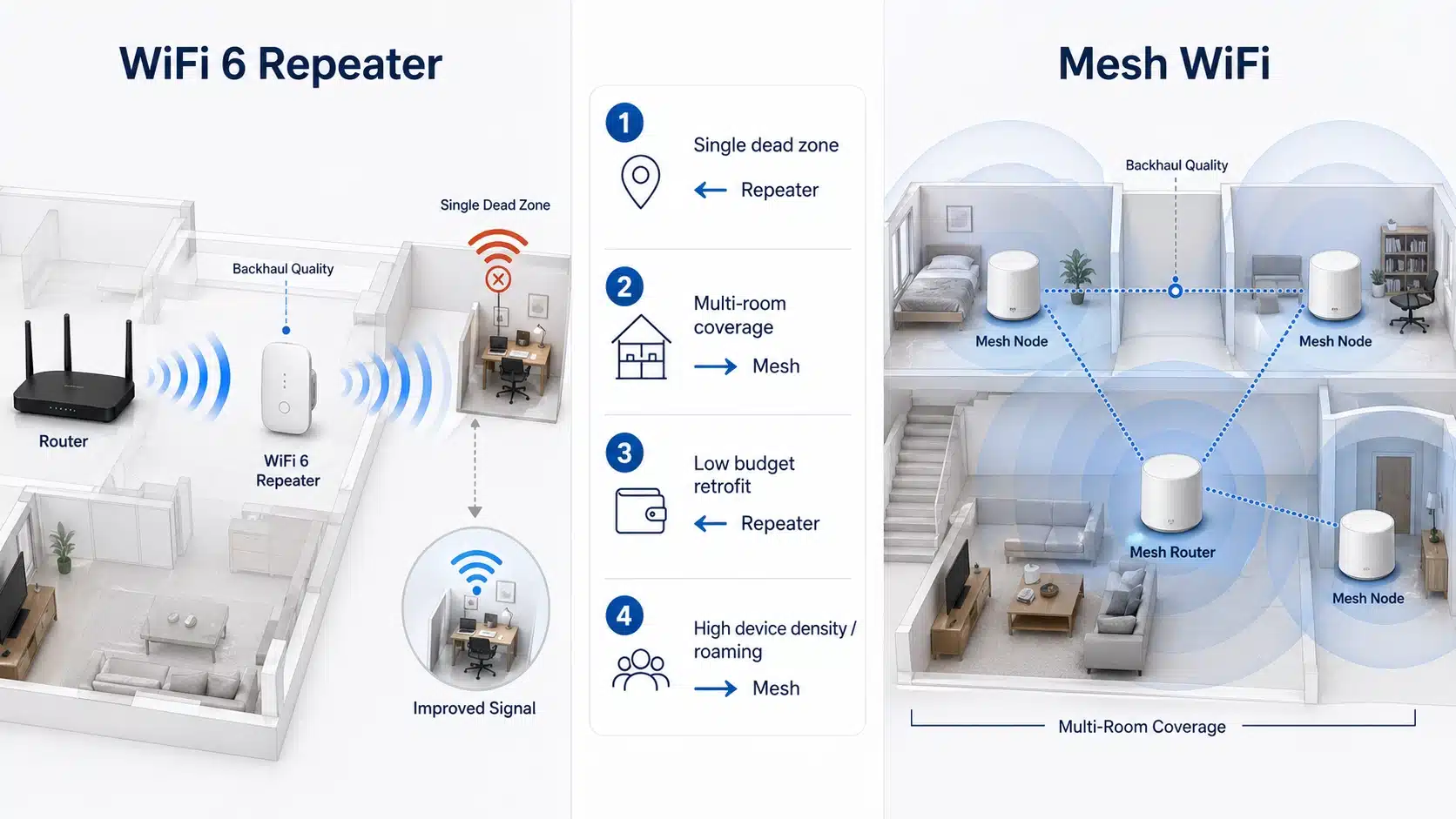
A WiFi repeater is usually the more practical choice when you need to improve one or two weak-signal areas with lower cost and simpler deployment. Mesh WiFi is usually the better choice when the real goal is broader whole-area coverage, smoother roaming, and a more consistent experience across multiple rooms or floors.
In real projects, the right decision depends less on the product label and more on layout, router position, wall and floor loss, user movement, budget, and installation complexity.
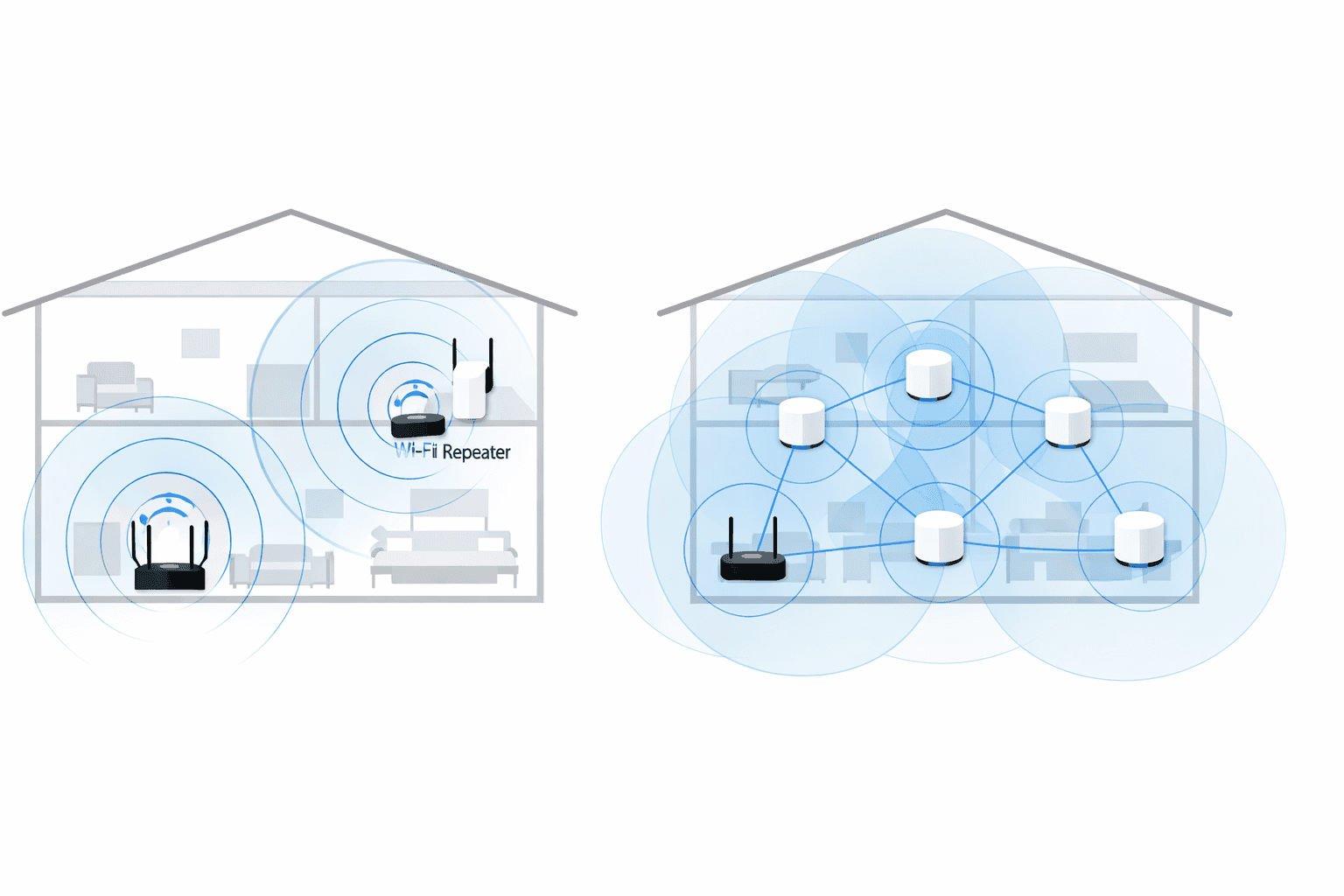
This guide compares WiFi repeater and mesh WiFi from both the user and buyer perspective. It explains what each option solves well, where each one underperforms, when an access point is the better direction, and what engineers, importers, distributors, and OEM / ODM buyers should check before choosing a product line or deployment path.
The most useful way to compare these two options is not to ask which one is better in general. The better question is which one fits the actual coverage problem, user expectation, and installation model more accurately.
Quick Answer: Should You Choose a Repeater or Mesh?
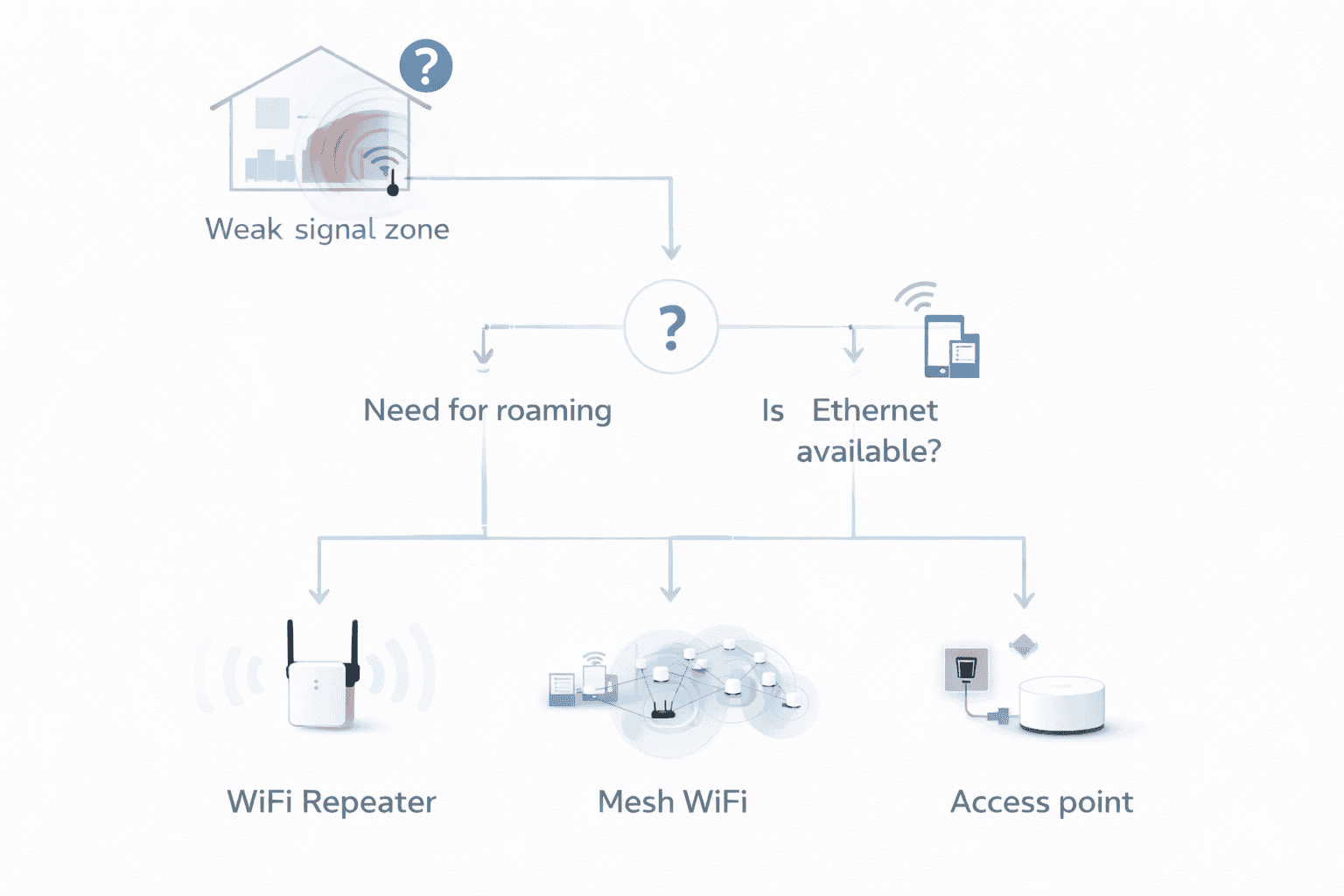
For many projects, the fastest way to make the right decision is to start with the coverage problem instead of the marketing term. A repeater is usually the right answer when the main router already covers most of the site and only one or two weak areas need help. Mesh is usually the stronger answer when users expect broader whole-area consistency and smoother movement between rooms. If Ethernet is already available, an access point may be the better engineering solution than either one.
| Project Condition | Better Direction |
|---|---|
| One weak bedroom, upstairs corner, garage, or workshop | WiFi repeater |
| Whole-home multi-room upgrade | Mesh WiFi |
| Smoother roaming matters more than one local dead zone | Mesh WiFi |
| Ethernet backhaul is already available | Access point |
| Price-sensitive retrofit with simple installation goals | WiFi repeater |
| Premium home networking or broader system upgrade | Mesh WiFi |
Choose a WiFi Repeater if
- You need to fix one or two weak-signal areas rather than redesign the whole network.
- The main router already works well across most of the space.
- You want a simpler and lower-cost deployment.
- The project is a bedroom, upstairs hallway, garage, workshop, reception corner, or small office back room.
- You are positioning products for entry-level or mid-range retail and distribution demand.
Choose Mesh WiFi if
- You want broader coverage across multiple rooms or floors.
- Users move around frequently and expect smoother roaming.
- The project is more experience-driven than price-driven.
- You are targeting premium residential channels or higher-end whole-home networking demand.
- The issue is not one dead zone, but a broader coverage consistency problem.
Choose an Access Point if
- Ethernet backhaul is already available.
- You want stronger and more stable performance than wireless repeating usually delivers.
- The site is a shop, office, classroom, clinic, or light commercial space with wired infrastructure.
- The project involves more concurrent devices or more performance-sensitive traffic.
What a WiFi Repeater Actually Solves
A WiFi repeater receives an existing wireless signal from the main router and rebroadcasts it to extend usable coverage into another area. Its purpose is not to replace the router. Its purpose is to improve coverage where the router alone does not deliver stable signal quality.
In practical deployment, a repeater works best when it is installed in a position where the router signal is still reasonably strong. That point is critical. A repeater cannot create strong coverage from an input signal that is already weak or unstable. This is why many disappointing repeater results are actually placement problems rather than hardware-category problems.
A repeater is often a good fit for targeted extension needs such as a weak upstairs room, a garage that receives partial coverage from the house, a workshop behind the main office, or a small office corner at the edge of the router's effective range. In these cases, the real goal is usually to make one local area usable without moving into a full wireless redesign. For a broader definition, see what a WiFi repeater is and how it works.
What a Mesh WiFi System Actually Solves
A mesh WiFi system uses multiple coordinated nodes to create broader and more even wireless coverage across a larger area. Instead of focusing mainly on one weak-signal extension point, mesh is designed to improve overall consistency across a house, apartment, or office layout.
This means mesh is usually better when the real issue is not one dead zone but a broader coverage structure problem. If users move between rooms and expect a more continuous experience, mesh often fits better than adding individual repeaters. It is especially relevant in multi-room and multi-floor environments where roaming quality matters almost as much as raw signal availability.
That said, mesh is not automatically the better answer for every project. It usually involves a higher budget, more system-level planning, and higher user expectations. It should be chosen because the site needs broader coverage continuity, not simply because it sounds more advanced.

Coverage, Roaming, Cost, and Deployment Trade-Offs
The most useful way to compare a WiFi repeater and mesh WiFi is not by asking which one is better in general. The better question is which one fits the coverage problem, user expectation, and installation model more accurately.
A repeater is usually stronger for limited extension into one or two weak zones. Mesh is usually stronger for broader area consistency and smoother movement between coverage zones. Cost, scalability, and support expectations also differ. That is why buyers should compare them as project tools, not as marketing labels.
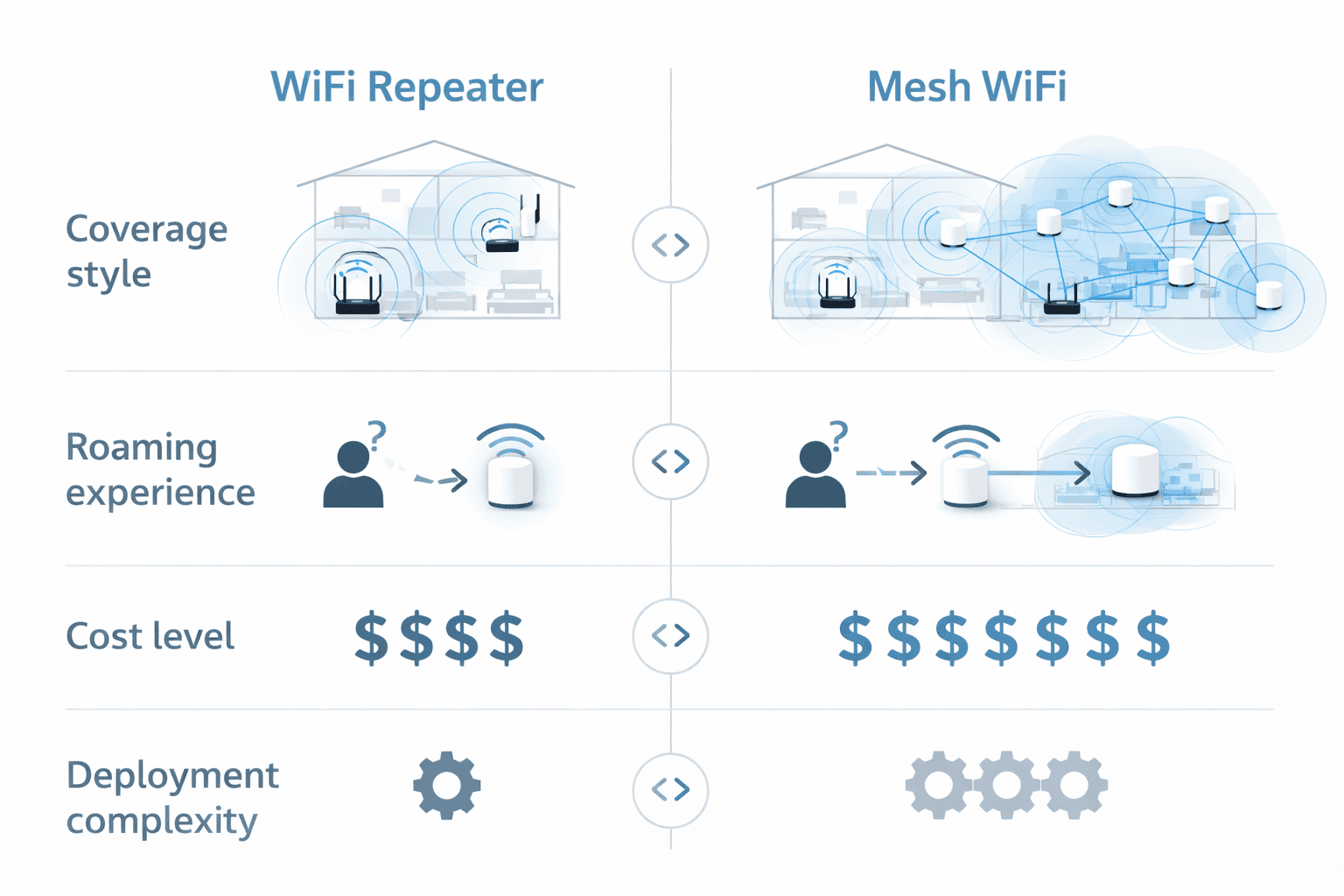
| Comparison Point | WiFi Repeater | Mesh WiFi |
|---|---|---|
| Main purpose | Extend signal into one or two weak areas | Improve broader whole-area coverage |
| Best fit | Local dead zones and simple retrofit projects | Multi-room or multi-floor environments |
| Roaming experience | Usually less seamless | Usually smoother across coverage zones |
| Deployment complexity | Lower | Medium to higher |
| Budget level | Lower to mid-range | Mid-range to premium |
| Scalability | Limited for broader area designs | Better for larger area expansion |
| Best for price-sensitive projects | Yes | Sometimes |
| Best for premium experience-driven projects | Sometimes | Yes |
Coverage should not be treated as an absolute promise in either category. Real results still depend on wall materials, floor structure, installation position, interference, antenna design, frequency band, client device capability, and the quality of the backhaul or upstream signal path.
When a Repeater Is Not the Better Choice
A repeater is useful, but it should not be treated as the correct answer for every wireless problem. Choosing the wrong architecture is one of the main reasons buyers become dissatisfied with otherwise reasonable hardware.
- If the site needs smooth roaming across multiple rooms or floors, mesh is often more suitable.
- If Ethernet is already available, access point deployment may deliver stronger and more stable performance.
- If the upstream signal is already weak at the intended installation area, a repeater will not solve the root problem well.
- If users expect near-router performance everywhere, a repeater may not match those expectations.
- If the project is light commercial or office-based with more concurrent traffic, AP-based design may be the better long-term path.
Why Some Repeater Deployments Underperform
Many users assume a repeater underperforms because repeaters are inherently weak products. In reality, underperformance usually comes from system conditions, installation mistakes, or unrealistic expectations.
The first common issue is weak upstream signal. A repeater cannot repeat a strong connection if the incoming signal is already unstable. The second issue is wrong placement. Installing the repeater too far from the router gives it a poor source signal. Installing it too close to the router may not extend coverage far enough to solve the real weak area. The third issue is expectation mismatch. Coverage extension is not the same as replacing the main router or wired backhaul. The fourth issue is using a repeater where mesh or access point architecture is actually more suitable.
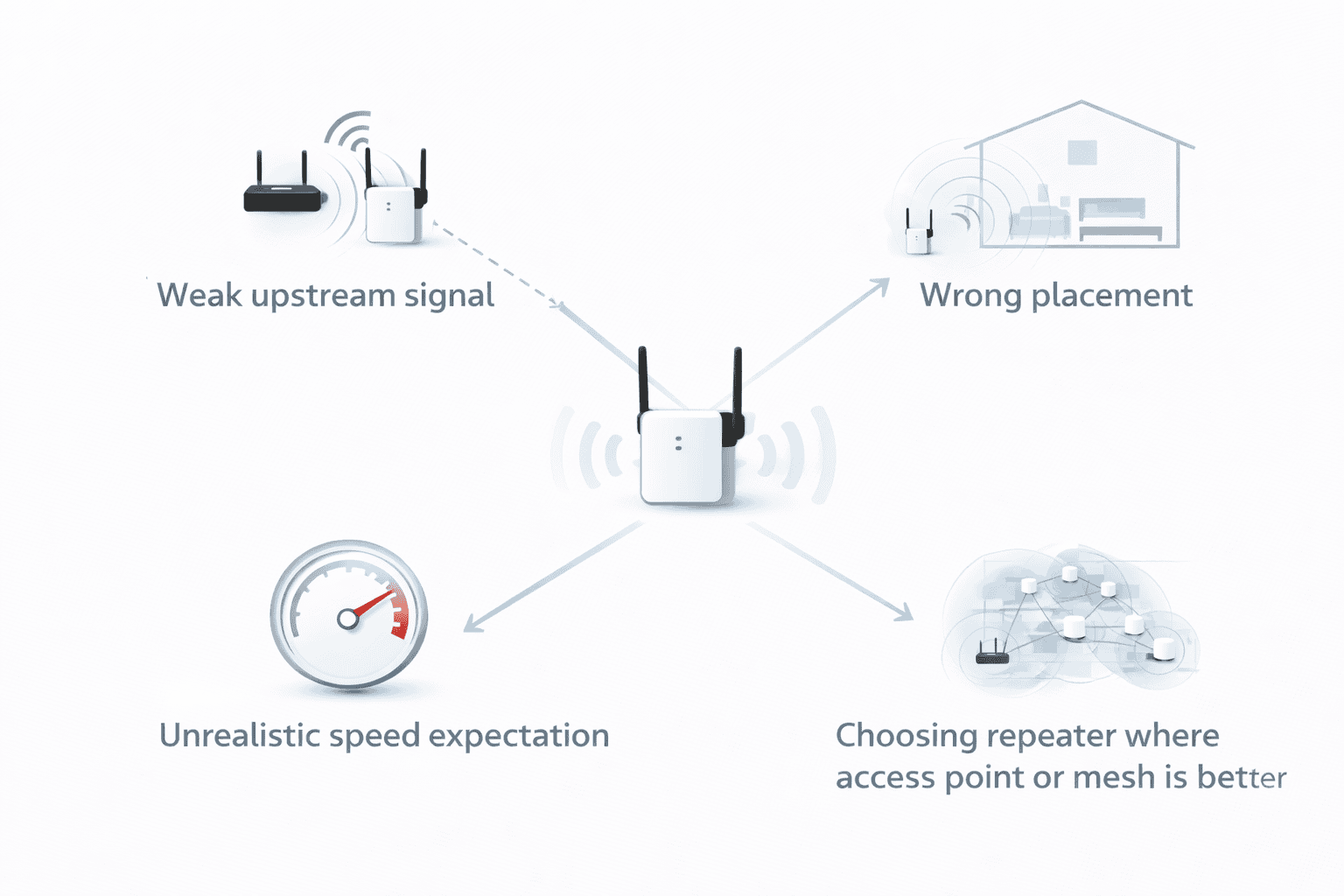
| Symptom | Likely Cause | Corrective Action |
|---|---|---|
| Repeater connects but real usage remains slow | Weak upstream signal from the main router | Move the repeater closer to the router while keeping it between the router and the weak area |
| Signal icon looks strong but usage is unstable | Interference, wall loss, or overloaded band conditions | Recheck placement, local interference sources, and whether band selection matches the environment |
| Coverage improved only slightly | The repeater is too close to the router or too deep inside the dead zone | Reposition it to a better midpoint with a more reliable source signal |
| Users notice interruptions while moving through the site | The layout is better suited to mesh WiFi | Re-evaluate whether mesh is the better architecture for the roaming requirement |
| Office users still report inconsistent performance | The site may need access point deployment instead of wireless relaying | Review wired backhaul availability and compare AP-based design |
Repeater vs Mesh vs Access Point: Selection Logic
In practical engineering work, the real decision is often not only repeater versus mesh. It is whether the site needs local wireless extension, broader multi-node wireless coverage, or wired backhaul with dedicated access points. The correct answer depends on the structure of the site, not only on consumer-facing product labels.
If the main router already covers most of the site and only one local area needs help, a repeater is often sufficient. If users need better roaming and more consistent coverage across multiple rooms, mesh is usually the stronger option. If Ethernet exists or can be added easily, an access point usually provides the most predictable performance path.
Which One Is Better for Home, Small Office, and Light Commercial Projects?
Home
In home use, a repeater is often enough when the problem is limited to one or two dead zones such as an upstairs bedroom, a rear room, a garage, or a small home-office corner. Mesh is usually more suitable for larger homes, multi-floor layouts, or users who expect broader whole-home consistency and smoother movement between rooms.
Small Office
In a small office, a repeater can work well when the goal is simply to extend usable coverage into one edge room or back-office area without redesigning the network. If more users move through multiple rooms, rely on video conferencing, or expect stronger overall consistency, mesh or access point deployment is often the better choice.
Light Commercial
In light commercial settings, a repeater can still be useful for limited extension scenarios where installation simplicity and budget control matter. However, where user experience is customer-facing, or where more stable multi-area coverage is required, mesh or access points are usually better aligned with the real deployment goal.
Real Project Scenarios
Scenario 1: One Weak Upstairs Bedroom
What happened: The main router covered the first floor well, but an upstairs bedroom had unstable signal and inconsistent browsing quality.
Surface reason: The user assumed the router itself was too weak.
System-level reason: The router signal was still usable in the upstairs hallway, but the final bedroom suffered from wall loss and distance-related attenuation.
Corrective action: A repeater placed in the hallway between the router and the room improved usable coverage more efficiently than replacing the entire wireless system.
How to prevent recurrence: Check whether the site has one local dead zone or a true whole-home coverage problem before choosing repeater or mesh.
Scenario 2: Small Office Back Room with a Wired Device
What happened: A small office needed better signal in a back room used for laptop work, printing, and inventory updates.
Surface reason: Staff believed a full multi-node mesh deployment was necessary.
System-level reason: Most of the office already had acceptable coverage. The issue was limited to one isolated room at the edge of the router's effective range.
Corrective action: A repeater with an Ethernet port solved the wireless extension need and also supported a wired printer connection in that room.
How to prevent recurrence: Evaluate whether the project needs broader roaming or only a single extension point before moving to mesh.
Scenario 3: Larger Multi-Room Home with High Roaming Expectation
What happened: Users complained about inconsistent experience while moving through multiple rooms and floors.
Surface reason: The first assumption was that a stronger repeater would solve the issue.
System-level reason: The real problem was not one dead zone. It was a broader whole-home coverage and roaming expectation mismatch.
Corrective action: Mesh WiFi was the better solution because the site required wider coverage continuity, not just one local signal extension point.
How to prevent recurrence: Map user movement patterns early. Roaming requirement is often the main divider between repeater and mesh.
Buyer Checklist Before Choosing Repeater or Mesh
Before selecting a product or deployment direction, buyers should answer a few practical questions. These questions are more useful than simply comparing model names or WiFi generations in isolation.
- How many weak-signal areas actually need to be fixed?
- Do users need seamless roaming or only stronger signal in one area?
- Is Ethernet wiring already available?
- How many devices are expected to be active at the same time?
- Is the project more cost-sensitive or experience-sensitive?
- Will the product be sold to DIY users or installed by professionals?
- Is the goal an entry-level coverage solution or a premium upgrade path?
- Does the project require a repeater with Ethernet, AP mode, or a more structured system design?
| Buyer Focus | What to Check |
|---|---|
| Retail | Target price band, ease of explanation, expected installation difficulty |
| Distribution | SKU coverage, replenishment logic, demand by standard and form factor |
| Project supply | Layout fit, roaming need, Ethernet availability, support burden |
| OEM / ODM | Chip platform, firmware features, plug type, packaging, compliance target, and market positioning |
Compatibility and Specification Notes Buyers Should Not Ignore
WiFi generation alone should not decide the entire purchase. WiFi 6 or WiFi 7 does not automatically mean a product is more suitable for every project. Real selection still depends on frequency-band support, antenna design, Ethernet requirements, firmware function, compatibility boundaries, deployment environment, and buyer budget.
It is also important not to mix different technical categories. WiFi standards such as IEEE 802.11n, 802.11ac, or 802.11ax are not the same as security mechanisms such as WPA2 or WPA3. WPS is a setup method, not a security standard. Wi-Fi Alliance certifications are not the same as market access requirements such as FCC, RED, RoHS, REACH, or UKCA. Serious buyers should keep those categories separate when reviewing supplier claims and product documentation.
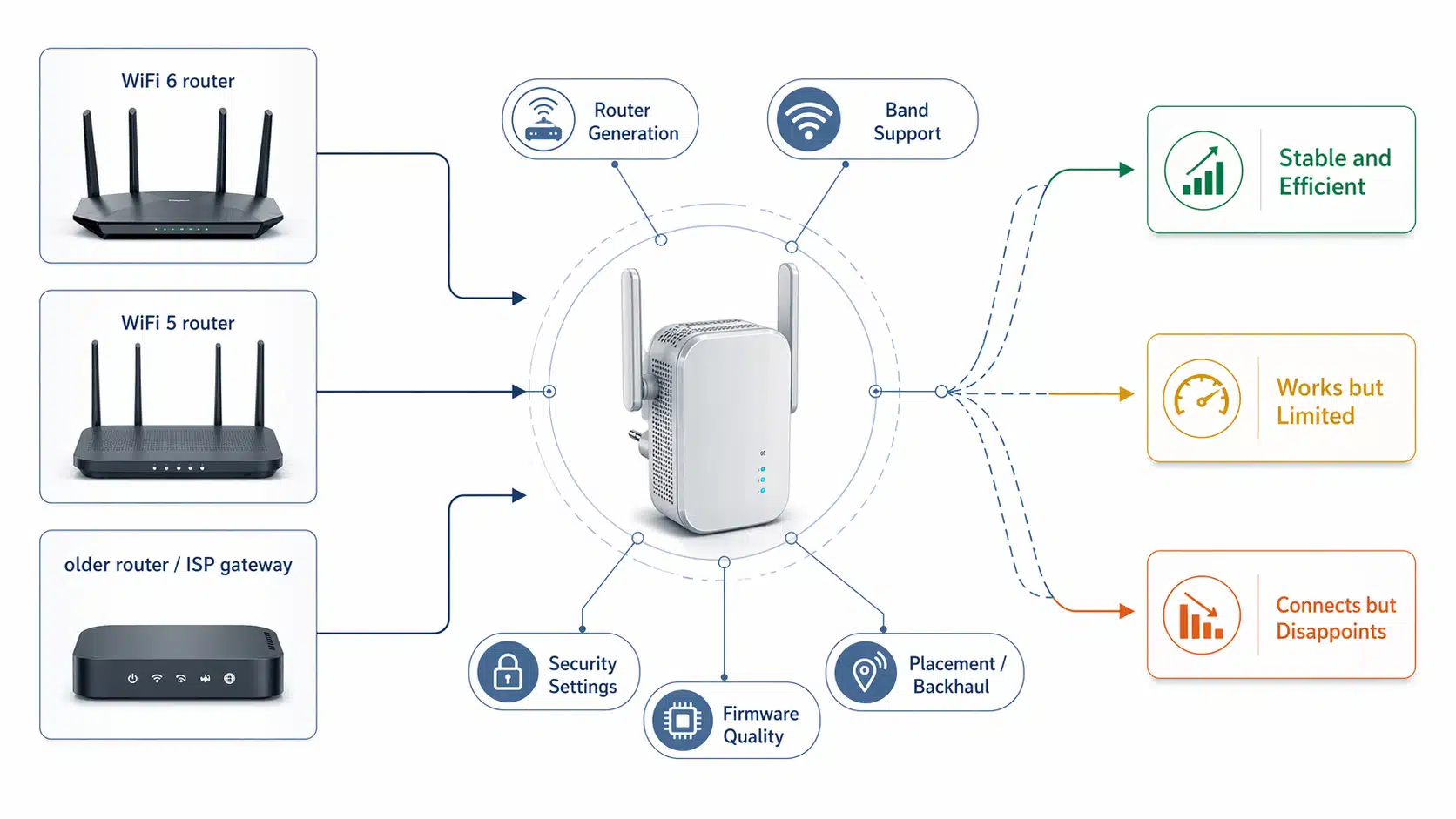
Compatibility should also be discussed carefully. A repeater may work with many mainstream routers, but buyers should avoid assuming unlimited or universal compatibility. Band support, firmware behavior, security settings, region-specific configuration, and deployment conditions can all affect the final result.
Frequently Asked Questions
Conclusion
A WiFi repeater and a mesh WiFi system both have value, but they fit different project conditions. A repeater is usually the better choice when the goal is to extend usable coverage into one or two weak-signal areas with lower cost and simpler deployment. Mesh is usually the better choice when the goal is broader whole-area coverage and smoother roaming across a larger environment. If Ethernet wiring is available, an access point may be the stronger solution than either one.
The best decision should be based on layout, source signal quality, user movement, traffic demand, budget, and installation model. Buyers who choose according to real deployment conditions usually get better long-term results than buyers who choose only by product popularity or marketing language.
Explore Related WiFi Repeater Paths
Core Guide
By Scenario
Project Use