AX1800 vs AX3000 WiFi 6 Repeater: Which Speed Class Should Buyers Choose?
For most home and small-office WiFi extension projects, an AX1800 WiFi 6 repeater is enough when the main goal is covering one weak room, one hallway, or a small dead zone. AX3000 becomes more valuable when the repeater must serve more devices, preserve a stronger 5 GHz backhaul, support higher peak client speed, or fit a stronger OEM / ODM product line. The real decision should not be based only on the number printed on the box. Backhaul signal quality, device density, antenna design, firmware stability, Ethernet port design, thermal control, and product positioning often matter more than the advertised AX class.
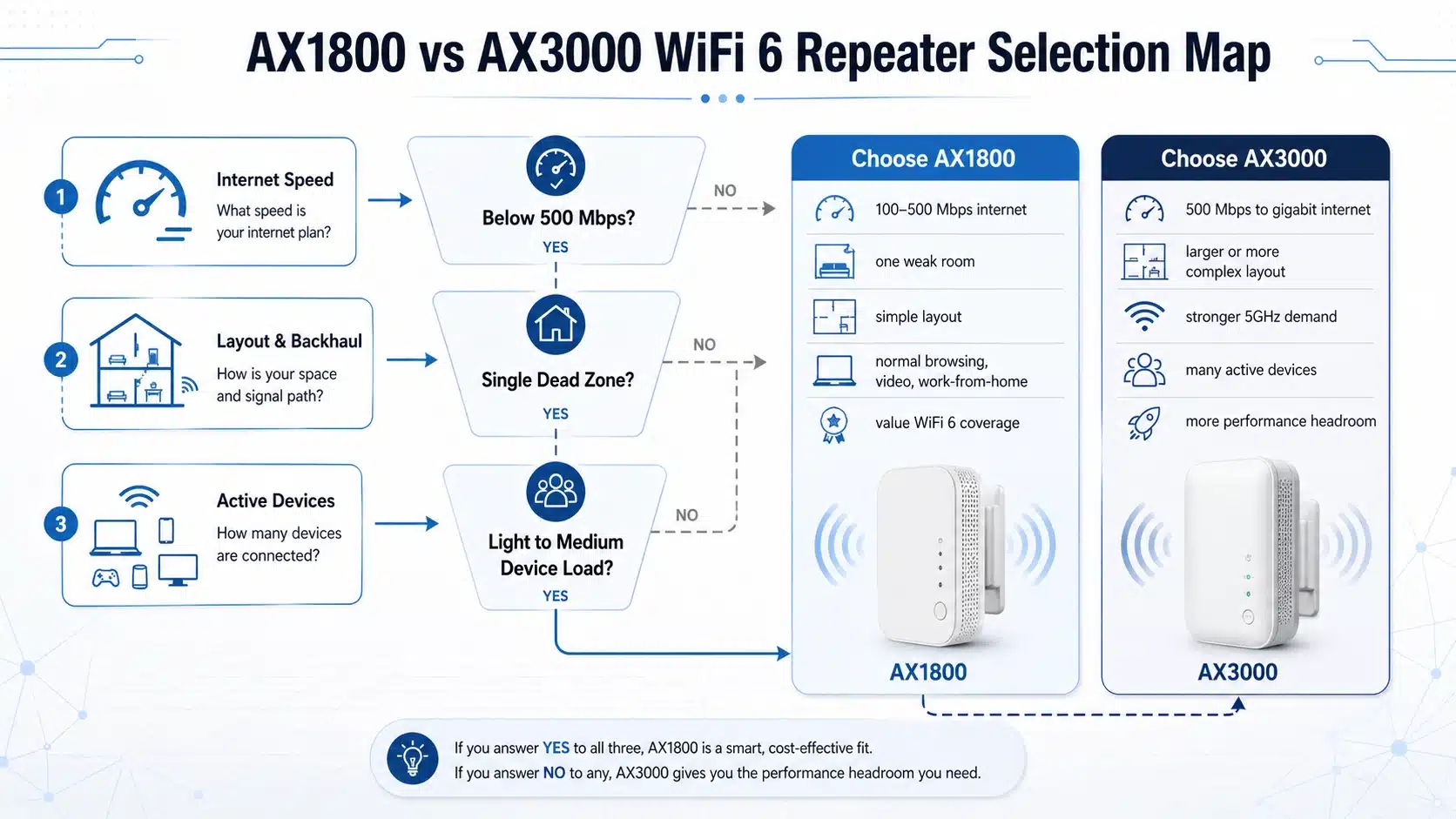
This image should be used near the beginning of the article because it summarizes the whole decision logic. It helps users quickly understand that AX class selection is not only a speed comparison. It is a balance between coverage target, backhaul quality, device count, product cost, and target market level.
Detailed explanation: Buyers often compare AX1800 and AX3000 only by the advertised number, but the repeater must first receive a usable signal from the main router before it can extend WiFi effectively. For B2B buyers, the correct question is not simply “Which one is faster?” but “Which speed class matches the use case, price segment, thermal design, antenna layout, chipset platform, and expected support burden?”
Quick Answer: AX1800 or AX3000?
Choose AX1800 when the application is basic WiFi extension: one room, one floor corner, a small apartment, a moderate number of devices, or a cost-sensitive product line. Choose AX3000 when the repeater needs stronger 5 GHz capacity, better product differentiation, denser client support, or a more premium position in a WiFi 6 repeater portfolio.
AX1800 is usually enough when:
- The user wants to fix one weak WiFi zone.
- The main router is also mid-range WiFi 6.
- The repeater will serve phones, laptops, cameras, or basic streaming devices.
- Budget and compact housing size are important.
- The product is positioned as an entry or mainstream WiFi 6 repeater.
AX3000 makes more sense when:
- The repeater must support more devices at the same time.
- 5 GHz backhaul and 5 GHz client performance are important.
- The product needs a stronger specification story for retail or B2B buyers.
- The customer expects a higher-end WiFi 6 repeater SKU.
- The project requires better capacity headroom, not only basic coverage.
Engineering note: AX3000 does not automatically guarantee better user experience. If the repeater is placed too far from the router, the backhaul link becomes weak. In that situation, the repeater may still show a strong extended WiFi name to the client, but the real connection behind it is already limited by poor backhaul quality.
What Do AX1800 and AX3000 Actually Mean?
AX1800 and AX3000 are marketing speed classes for WiFi 6 devices. They represent combined theoretical PHY rates across different frequency bands, not guaranteed real-world throughput. For many dual-band WiFi 6 repeaters, AX1800 commonly means a 2.4 GHz band around 574 Mbps plus a 5 GHz band around 1201 Mbps. AX3000 commonly means a 2.4 GHz band around 574 Mbps plus a stronger 5 GHz band around 2402 Mbps.
That difference matters because most modern high-speed client traffic uses 5 GHz whenever signal conditions allow it. However, in repeater mode, the same wireless environment must handle both the connection to the main router and the connection to client devices. This is why backhaul quality and band management are so important.

This image explains why AX3000 looks more attractive on paper: it normally provides a higher 5 GHz theoretical rate. But the article should make clear that theoretical PHY rate is not the same as real user throughput.
Detailed explanation: A WiFi 6 repeater is limited by the quality of the upstream wireless link, RF interference, channel width, router capability, antenna design, firmware control, and the number of connected clients. AX3000 provides more headroom, but only when the surrounding network conditions can actually use that headroom.
| Item | AX1800 WiFi 6 Repeater | AX3000 WiFi 6 Repeater | Buyer Interpretation |
|---|---|---|---|
| Typical speed class | About 1800 Mbps combined theoretical rate | About 3000 Mbps combined theoretical rate | AX3000 has higher specification headroom, mainly on 5 GHz. |
| 2.4 GHz role | Basic range and legacy compatibility | Basic range and legacy compatibility | 2.4 GHz is useful for distance and IoT devices, but it is usually not the main performance differentiator. |
| 5 GHz role | Main band for everyday speed | Stronger band for higher speed headroom | AX3000 is more attractive when 5 GHz backhaul or 5 GHz client speed matters. |
| Best application | One weak area, basic home extension, budget SKU | More devices, premium home coverage, stronger SKU positioning | The right choice depends on scenario, not only the number. |
| B2B product role | Mainstream WiFi 6 repeater model | Mid-high WiFi 6 repeater model | AX3000 gives more room for product differentiation in retail and OEM / ODM catalogs. |
Why Backhaul Placement Matters More Than the AX Number
A WiFi repeater works by receiving the existing router signal and then rebroadcasting it. This means the repeater cannot create high-quality internet performance if its own connection back to the router is already weak. In real deployments, repeater placement often decides the final experience more than the difference between AX1800 and AX3000.
The best position is usually not inside the dead zone. It is normally placed between the router and the weak area, where the repeater can still receive a stable upstream signal. For more background on repeater compatibility and router matching, see our guide on whether a WiFi 6 repeater works with any router.

This image should be placed in the backhaul section because it explains the most common user mistake: placing the repeater inside the dead zone instead of within a stable router signal area.
Detailed explanation: When a repeater is too far from the router, the client may connect to the extended SSID with a strong local signal, but the repeater’s upstream link is weak. This creates slow speed, unstable video calls, high latency, and repeated reconnection complaints. For B2B product planning, firmware signal indicators, smart setup guidance, and clear placement instructions can reduce after-sales support pressure.
Device Density: When AX3000 Starts to Show Value
AX3000 becomes more meaningful when the repeater must support more active clients or maintain better performance under load. A single phone browsing websites does not need much capacity. But multiple phones, laptops, smart TVs, cameras, tablets, and IoT devices can create a more complex traffic environment.
WiFi 6 is based on IEEE 802.11ax and is designed to improve efficiency in more crowded wireless environments. The Wi-Fi Alliance Wi-Fi CERTIFIED 6 program highlights technologies such as OFDMA and MU-MIMO, while the IEEE 802.11ax standard page provides the formal standards reference behind the WiFi 6 generation.

This image helps users understand that repeater selection is not only about room size. Device density changes the real demand placed on the repeater.
Detailed explanation: In low-density use, AX1800 is often enough because the repeater is not heavily loaded. In higher-density environments, AX3000 gives more room for 5 GHz traffic, stronger product positioning, and better perceived performance when paired with suitable router capability and proper placement. However, capacity gains still depend on chipset design, antenna layout, channel environment, and firmware scheduling.
AX1800 vs AX3000 for Different Buyer Scenarios
Home Users
For a small home, apartment, or single weak room, AX1800 is usually the more practical option. It solves the most common coverage problem without pushing product cost too high.
Small Offices
For small offices with multiple laptops, video meetings, and shared cloud tools, AX3000 can be more suitable if the repeater has a strong backhaul position and the main router is also capable.
Retail Product Lines
AX1800 can serve as the mainstream WiFi 6 repeater SKU, while AX3000 can be positioned as the higher-performance model for buyers who compare specifications before purchase.
OEM / ODM Projects
For OEM / ODM buyers, the decision should include chipset platform, RF layout, thermal design, firmware features, housing cost, antenna form, certification planning, and target retail price.
Product Line Positioning for B2B WiFi Repeater Buyers
For B2B buyers, AX1800 and AX3000 should not be treated as isolated models. They should be planned as different layers of a WiFi 6 repeater portfolio. AX1800 can cover the mainstream volume market, while AX3000 can support a stronger specification story, better shelf positioning, and higher-value product segmentation.

This image should be used in the B2B section because it explains how importers, distributors, and OEM / ODM buyers can separate product roles instead of choosing only one model.
Detailed explanation: A practical WiFi 6 repeater catalog can use AX1800 for price-sensitive channels and AX3000 for stronger specification-driven channels. This helps avoid product overlap and gives sales teams a clearer story: basic coverage extension, higher-speed extension, Ethernet-supported models, plug-in designs, and customized antenna or housing options can each serve different buyer segments.
Engineering Factors That Matter Beyond AX1800 and AX3000
The AX label is only one part of repeater performance. When evaluating a WiFi 6 repeater for retail, wholesale, or OEM / ODM projects, buyers should also check the design details behind the specification.
| Engineering Factor | Why It Matters | Buyer Checkpoint |
|---|---|---|
| Backhaul signal quality | The repeater depends on the router-to-repeater link before it can extend WiFi. | Check placement guidance, signal indicator logic, and setup instructions. |
| Antenna design | Antenna layout affects coverage pattern, stability, and perceived range. | Compare internal antenna, external antenna, and housing constraints. |
| Chipset platform | The platform affects wireless features, firmware stability, heat, and cost. | Confirm chipset class, memory configuration, and supported firmware features. |
| Thermal design | Compact plug repeaters may heat up under long operation. | Review ventilation structure, housing material, and long-run stability tests. |
| Ethernet port | Ethernet can support wired client access or AP mode in some designs. | Check port speed, use mode, and whether the model supports AP / repeater mode. |
| Firmware and setup | Good firmware reduces returns and support tickets. | Look for WPS setup, web UI, app support, roaming behavior, and LED guidance. |
For related product categories, you can also review our WiFi repeaters overview, WiFi 6 repeaters, plug WiFi repeaters, and wireless WiFi repeater pages.
AX1800 vs AX3000: Which One Should You Choose?
For most buyers, the best choice can be made with a simple rule: choose AX1800 when you need reliable WiFi 6 coverage extension at a reasonable cost; choose AX3000 when you need stronger 5 GHz headroom, better multi-device performance, or a more premium product position.
Final recommendation: Do not choose AX3000 only because the number is larger. Choose it when the router, placement, device density, and market positioning can justify the higher class. For basic dead-zone repair, AX1800 is often the better value. For stronger B2B product differentiation, AX3000 is usually the more strategic SKU.
B2B Procurement Checklist
- Use case Is the product for one-room coverage, whole-home extension, or denser device environments?
- Router match Will most users pair it with WiFi 5 routers, WiFi 6 routers, or mixed router generations?
- Backhaul Does the product offer clear signal guidance during setup?
- SKU strategy Will AX1800 and AX3000 appear as separate product tiers in your catalog?
- Hardware Are chipset, memory, antenna, Ethernet port, and thermal design aligned with the target price?
- Support Does the firmware reduce common setup mistakes and compatibility complaints?
Recommended Next Reading
To build a stronger WiFi repeater knowledge path for buyers, connect this article with compatibility, placement, product category, and comparison pages.
Standards and Authority References
This article uses WiFi 6 and 802.11ax references as background support. These references help clarify that AX1800 and AX3000 belong to the WiFi 6 generation, but final repeater performance still depends on hardware design, firmware, RF environment, and installation quality.
FAQ: AX1800 vs AX3000 WiFi 6 Repeater
No. AX3000 has higher theoretical speed headroom, especially on 5 GHz, but it is not always better in real use. If the repeater is placed poorly or the main router cannot provide a strong backhaul signal, an AX3000 repeater may not perform better than a correctly placed AX1800 model.
Yes, AX1800 is enough for many homes when the goal is to fix one weak WiFi area, support normal browsing, video streaming, smart devices, and basic remote work. It is often the better value choice for mainstream WiFi 6 repeater applications.
Choose AX3000 when you need more 5 GHz speed headroom, more active device support, better product positioning, or a stronger WiFi 6 repeater SKU for a B2B product line. It is more useful when the router, backhaul placement, and client devices can benefit from the higher class.
Not automatically. Range is affected by transmit power limits, antenna design, housing structure, placement, walls, interference, and router signal quality. AX3000 mainly provides higher speed headroom, not a guaranteed range increase.
The most important factors are backhaul signal quality, placement, router capability, RF environment, antenna design, firmware stability, and device density. The AX speed class is important, but it should not be the only decision factor.
In many cases, yes. AX1800 can serve the mainstream price-sensitive segment, while AX3000 can support a stronger specification tier. This creates clearer product segmentation for distributors, retail channels, and B2B buyers.