WiFi Adapters Manufacturer for PC, Laptop & Desktop | OEM / ODM Supply
WiFi adapters are not selected in the same way.
Some buyers start with interface type. Others care more about wireless standard, device compatibility, Bluetooth integration, or operating system support.
Choose Your WiFi Adapter Path
Different buyers start from different selection points. Some begin with interface type, while others focus on wireless standard, target device, operating system, or sourcing stage. Use the paths below to move directly into the most relevant WiFi adapter category.
Start here if the host connection is already defined and interface fit matters before anything else.
Start here if router generation, wireless band support, or performance tier is your main filter.
Start here if the adapter is being chosen for a specific host device or usage environment.
Start here if the project is defined by Bluetooth, antenna form, or operating system support.
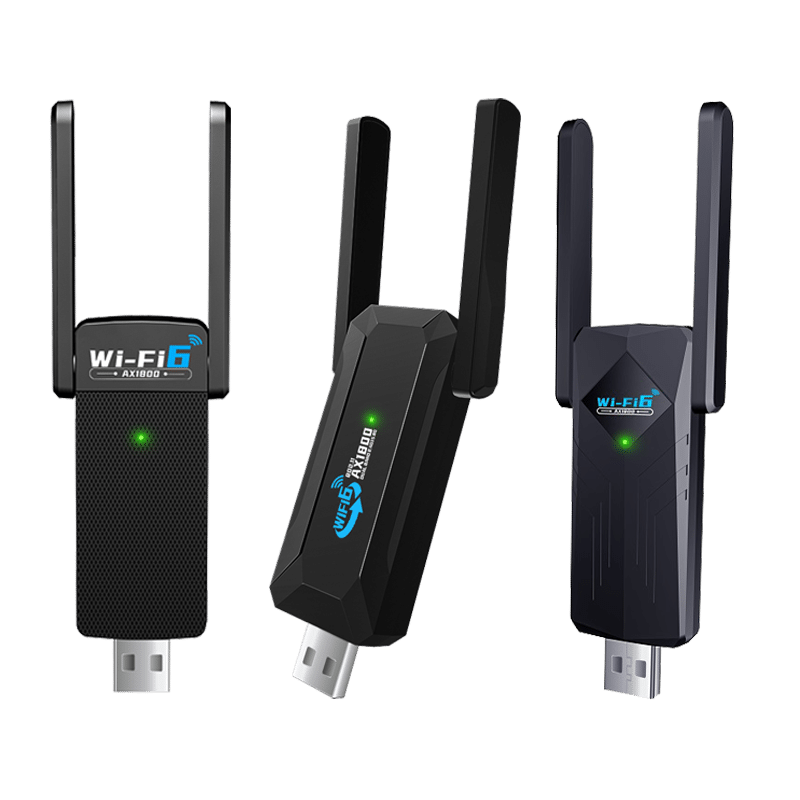
USB WiFi Adapters
The most common choice for simple wireless upgrades across PCs and laptops. Best suited to faster deployment and broad everyday compatibility.
PCIe WiFi Adapters
A stronger fit for desktop installations where internal expansion and antenna layout matter more than plug-and-play convenience.
WiFi Bluetooth Adapters
Used when one adapter is expected to provide both wireless LAN and Bluetooth functions in the same device.
Windows / Linux / Mac WiFi Adapter
Used when Windows, Linux, or macOS compatibility is the main selection filter rather than speed label alone.
What Buyers Should Actually Compare
WiFi adapter selection should not start from speed labels alone. In real projects, buyers usually need to compare interface fit, wireless generation, chipset platform, operating system support, antenna structure, and deployment convenience before deciding which category or model makes sense.
Rated speed is only one part of the picture. Actual suitability depends on the host device, operating system, adapter form factor, wireless environment, and how the product will be deployed or sourced.
| What to Compare | Why It Matters | What Buyers Often Miss |
|---|---|---|
| Interface Type | USB, PCIe, and other adapter forms do not serve the same host environment. Interface choice affects installation style, deployment speed, and where the product can actually be used. | Buyers often compare speed class first and only later realize the interface is not the best fit for the target device or deployment style. |
| Wireless Standard | WiFi 4, WiFi 5, WiFi 6, and WiFi 7 represent different network generations, positioning levels, and compatibility expectations. | A higher wireless generation does not automatically produce a better result if the router, host platform, or operating system cannot fully support it. |
| Chipset Platform | Chipset choice affects driver path, operating system behavior, long-term support, and supply continuity. It is often one of the most important factors in technical and OEM projects. | Many buyers focus on the outer shell or speed label and underestimate how much stability, compatibility, and sourcing consistency depend on the platform inside. |
| Operating System Support | Windows, Linux, and macOS projects do not follow the same compatibility path. Driver availability and platform behavior can strongly affect product fit. | Buyers sometimes treat operating system support as a minor note, even though it can be the main selection filter in real deployment. |
| Bluetooth Integration | Combo adapters can simplify purchasing and setup when both wireless LAN and Bluetooth are needed in one device. | Buyers may choose a combo model without first confirming whether Bluetooth is truly required, or whether the target platform supports the combined function as expected. |
| Antenna Design | Antenna form affects signal behavior, physical size, deployment flexibility, and the overall suitability of the adapter for different device types. | Smaller body size is often assumed to be better, even when the project would benefit more from a stronger external antenna structure or a more stable desktop-oriented design. |
| Deployment Convenience | Some projects prioritize fast installation, simple replacement, and lower support cost over peak specification. | Buyers sometimes over-prioritize paper specifications and under-prioritize ease of installation, packaging consistency, and everyday support efficiency. |
| Rated Speed vs Actual Fit | Speed class helps position products, but real deployment results depend on more than the number shown in the product title. | Rated speed is often treated as real throughput, even though actual performance is shaped by environment, router capability, platform limits, interference, and device setup. |
| Project Type | Retail demand, enterprise deployment, technical integration, and OEM / ODM sourcing do not follow the same buying logic. | A product that looks attractive for retail or online listing may not be the best choice for driver control, bulk consistency, or custom project requirements. |
For many buyers, the best WiFi adapter is not simply the one with the highest label. It is the one that matches the host device, operating system, installation style, and project goal more accurately.
This Category vs Similar Options
WiFi adapters are client-side connectivity products. They are designed to add or improve wireless access for one host device. They are not the same as repeater, mesh, access point, or bridge products, which are usually used to extend coverage, build infrastructure, or connect networks in a different way.
If the goal is to connect one computer or device to WiFi, an adapter may be the right path. If the goal is to improve coverage, extend signal reach, or build a broader wireless network, another product category may make more sense.
| Option | Best When | How It Differs | Not Ideal When |
|---|---|---|---|
| WiFi Adapter | One PC, laptop, Mac, desktop, or selected terminal device needs wireless connectivity or a wireless upgrade. | This is a client-side product. It adds wireless access to one host device rather than extending coverage for an area. | The real issue is weak room-to-room coverage, whole-home dead zones, or a network infrastructure limitation. |
| WiFi Repeater | The goal is to extend usable coverage into another room or nearby area where the upstream signal is still strong enough. | A repeater expands wireless reach. It does not replace the function of a client adapter inside one host device. | The device itself has no WiFi capability and simply needs a wireless client interface. |
| Mesh WiFi System | The project requires broader multi-room coverage, smoother roaming, and a more coordinated network layout. | Mesh is an infrastructure-side coverage solution. It is designed for area-wide wireless continuity rather than single-device connectivity. | The requirement is only to add WiFi to one PC, laptop, or terminal device without changing the broader network layout. |
| Access Point | The project needs a wired-to-wireless network expansion point or a more structured local coverage node. | An access point builds or extends part of the wireless infrastructure. It is not a plug-in client adapter for an end device. | The buyer only needs to give one computer or device wireless capability with minimal installation effort. |
| CPE / Bridge | The requirement involves directional wireless links, outdoor connections, or network bridging between locations or devices. | Bridge and CPE products are typically used for link-building or point-to-point style deployment, not ordinary local client upgrades. | The need is a simple indoor wireless adapter for a desktop, laptop, Mac, or standard client-side device. |
In most cases, the first question is not which product has the highest label. The better starting point is whether the project needs client-side wireless access, local coverage extension, or a more structured network solution.
Where This Type Makes More Sense
WiFi adapters make the most sense when the goal is to add or improve wireless connectivity for one host device without changing the broader network structure. In the right scenario, they offer a faster and more practical path than repeater, mesh, access point, or bridge products.
The best fit usually depends on the host device, operating system, installation preference, and whether the project is driven by quick deployment, compatibility requirements, or sourcing goals.
General PC and Laptop Upgrades
WiFi adapters make more sense when the project is simply to give one PC or laptop better wireless access without changing the wider network environment.
Desktop-Focused Installations
This type is a stronger fit when the target device is a desktop and the buyer wants a practical wireless solution without redesigning network infrastructure.
Windows, Linux, or Mac Compatibility Projects
WiFi adapters make more sense when platform support is the real decision point and the buyer needs to filter products by operating system behavior rather than by speed label alone.
Bluetooth Combo Demand
This type is a practical choice when one adapter is expected to handle both wireless LAN and Bluetooth functions in the same device.
Retail, Channel, and Replacement Demand
WiFi adapters are often a better fit when buyers need products that are easier to deploy, easier to replace, and easier to position for everyday market demand.
OEM / ODM and Bulk Supply Projects
This type makes more sense when the project is moving toward platform matching, packaging control, compatibility review, and bulk product selection rather than infrastructure deployment.
In most cases, WiFi adapters are the better path when the project is centered on one end device, one platform environment, or one sourcing program rather than broader wireless coverage or infrastructure expansion.
OEM / ODM / Bulk Supply Support
For many B2B projects, the main question is not only which WiFi adapter category looks suitable on paper. Buyers also need to confirm platform fit, packaging direction, driver path, specification stability, and whether the product line can be supplied in a controlled and repeatable way.
In bulk supply and OEM projects, product continuity, compatibility clarity, and packaging control often matter more than headline speed labels alone.
Buyer Checklist Before Moving Forward
Before moving into quotation, sampling, or bulk order discussion, buyers usually need to confirm the following checkpoints.
Support Areas Buyers Usually Need
The value of OEM / ODM support is not just customization. It is also about reducing sourcing friction and making the project easier to evaluate and manage.
Category Matching
Support for narrowing the right adapter category before the project moves into model-level comparison.
Sample Evaluation
Support for sample review around interface fit, platform compatibility, and product direction before bulk discussion.
Packaging Options
Support for standard packaging, bulk packing, private label presentation, and project-specific labeling needs.
Bulk Supply Alignment
Support for matching product family direction with wholesale demand, reseller needs, or regular project replenishment.
OEM Project Coordination
Support for projects that need clearer control over branding, packaging structure, and product-line consistency.
ODM Development Direction
Support for projects that may require deeper discussion around product direction, specification boundaries, and custom development scope.
For many adapter projects, the better sourcing path starts with confirming the right product family, the right compatibility direction, and the right packaging or project scope before pricing becomes the main discussion.
WiFi Adapter FAQ
These questions focus on the issues buyers usually need to confirm before moving from category selection into product comparison, compatibility review, or sourcing discussion.
In most cases, the right WiFi adapter is not decided by speed label alone. Interface fit, operating system support, chipset platform, and project type often matter just as much.
What is the difference between a USB WiFi adapter and a PCIe WiFi adapter?
A USB WiFi adapter is usually the easier option for general upgrades because installation is simpler and replacement is faster. A PCIe WiFi adapter is more often chosen for desktop-focused environments where internal installation and antenna layout matter more than plug-and-play convenience.
Does a higher WiFi generation always mean a better buying choice?
Not always. A higher wireless generation can improve product positioning, but the real result still depends on router capability, operating system support, interface fit, and the host device itself. In many projects, compatibility and deployment logic should be checked before generation label becomes the main decision factor.
Is rated speed the same as actual throughput?
No. Rated speed is a positioning label, not a guarantee of real transfer performance. Actual throughput depends on signal conditions, router capability, interference, operating system behavior, host limitations, and how the adapter is deployed in the real environment.
When does a WiFi Bluetooth adapter make more sense?
A WiFi Bluetooth adapter makes more sense when one device is expected to handle both wireless LAN and Bluetooth functions in the same setup. It can simplify purchasing and installation, but buyers should still confirm Bluetooth version, platform compatibility, and whether the combined function is actually required for the project.
Should buyers filter by Windows, Linux, or Mac support early?
Yes. In many real projects, operating system support should be treated as an early filter rather than a later detail. Driver path, chipset behavior, and compatibility expectations can vary significantly across Windows, Linux, and macOS environments.
When is a WiFi adapter the wrong product path?
A WiFi adapter is the wrong path when the real requirement is to improve area coverage, solve room-to-room signal problems, or build a broader wireless network. In that case, a repeater, mesh system, access point, or bridge product may be a more suitable category.
What should buyers confirm before moving into OEM or bulk supply discussion?
Buyers should usually confirm the target interface, host device type, operating system support, chipset direction, packaging needs, and project scope before pricing becomes the main discussion. This reduces confusion later in sample review, quotation, and bulk order planning.
Is one WiFi adapter category suitable for every project type?
No. Different projects prioritize different things. Some buyers care most about easy deployment, while others focus more on desktop installation, Bluetooth integration, operating system compatibility, or sourcing control. That is why category selection should happen before model-level comparison.
Contact Us
Please fill out the form below, and our professional consultants will assist you as soon as possible, typically within 24 hours.
Contact Information
Phone: +8618682468703
WhatsApp: +8618682468703
Email: addway.wang@igrentech.cn
Address: Room 301, Building A2, Qiangrong East Industrial Zone, No. 723 Zhoushi Road, Hangcheng Street, Shenzhen, Guangdong, China