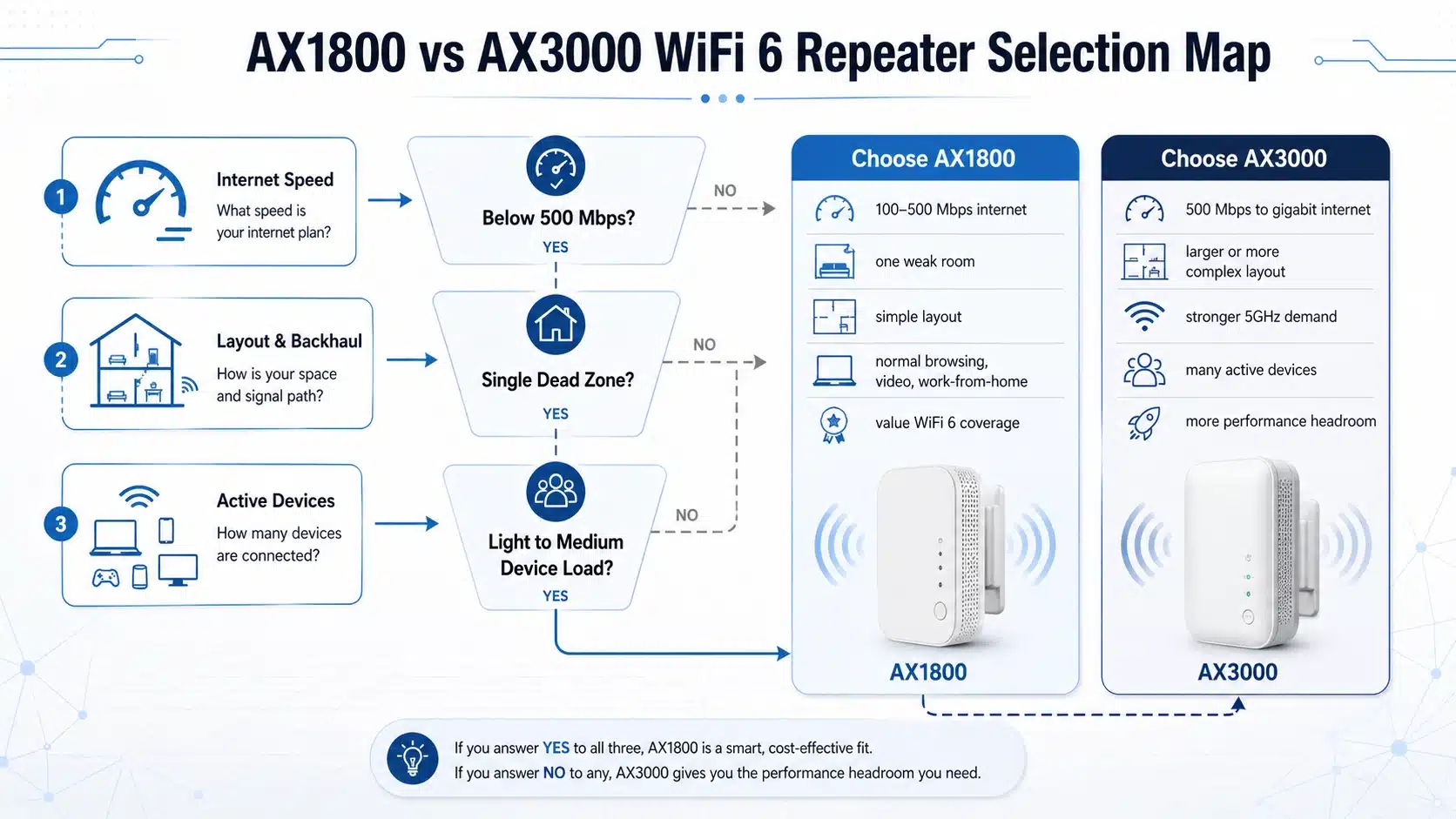
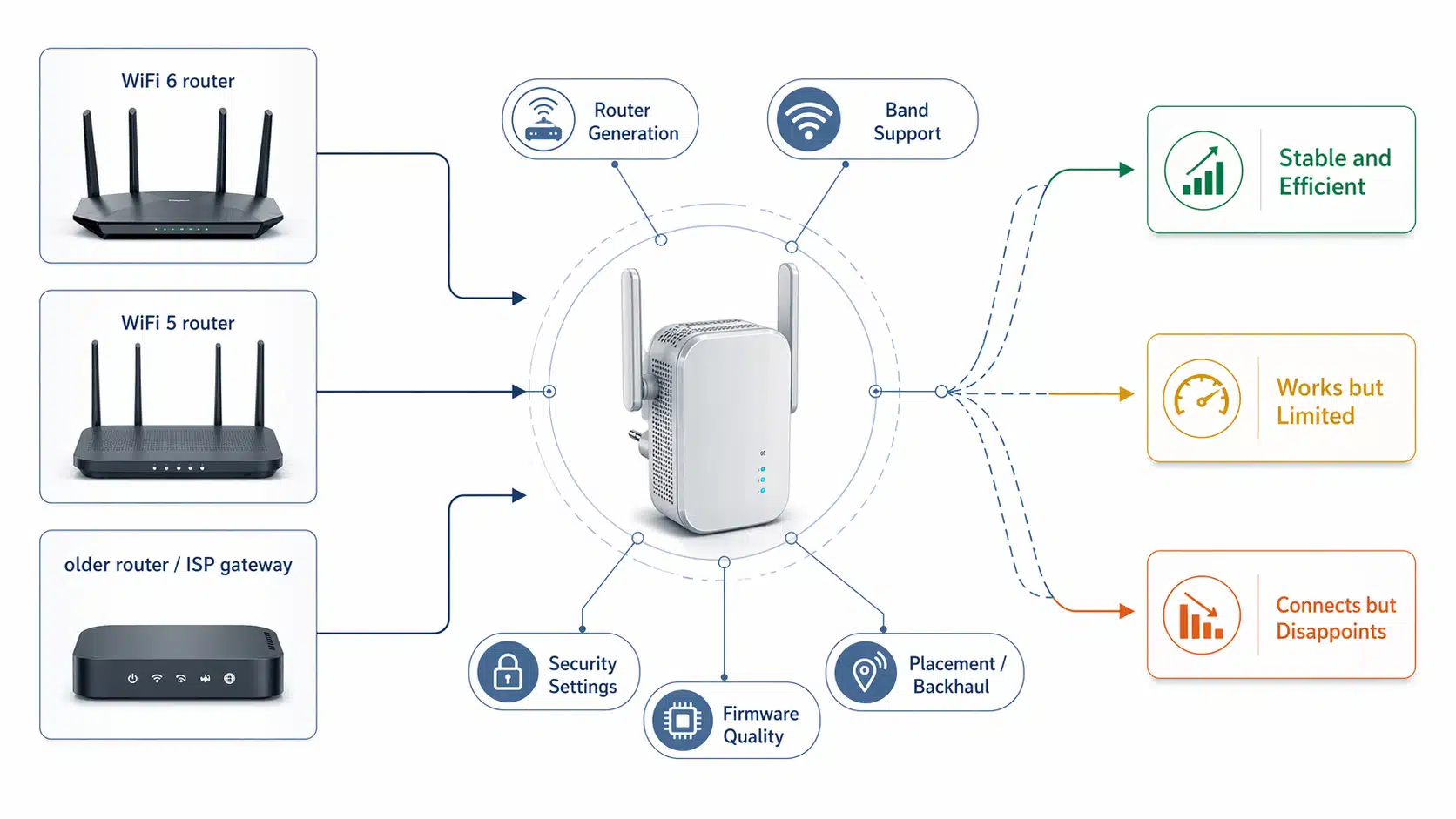
Yes, a WiFi 6 repeater usually works with most mainstream routers, including many WiFi 5 routers and some older WiFi 4 models. But buyers often misunderstand what “works” really means. In real deployment, compatibility is only the first layer. The final result still depends on router generation, band support, security settings, firmware behavior, and how strong the repeater’s backhaul link is before it repeats anything.
Quick answer
A WiFi 6 repeater can often connect to older routers because newer WiFi generations are designed to remain compatible with earlier ones. Intel’s Wi-Fi 6 overview explains the generation shift and backward-compatibility context well. However, backward compatibility does not automatically mean WiFi 6-class speed, latency, or stability in the extended area. A setup can be technically compatible and still feel weak if the router is old, the upstream signal is poor, or the deployment is asking a repeater to solve the wrong problem.
If you are still evaluating the basics of this product category, it helps to start with what is a WiFi repeater, then come back to compatibility with a clearer picture of what repeating actually does inside the network path.
Core conclusion: a repeater is not judged only by whether it connects. It must still make practical sense as a complete wireless link.
When buyers ask whether a WiFi 6 repeater works with any router, they are usually asking more than a setup question. What really matters is whether the repeater can connect, remain stable, and still deliver useful coverage and acceptable performance in the target area.
Does a WiFi 6 repeater work with any router?
In most home and small-office cases, the answer is yes. A WiFi 6 repeater can usually join an existing router and extend coverage, even if that router is older. That is why many buyers successfully pair newer repeaters with WiFi 5 routers and even some older WiFi 4 gateways. But “can connect” and “will perform well” are not the same answer.
Real compatibility should be judged at four levels: protocol compatibility, band compatibility, security compatibility, and deployment compatibility. A repeater may pass the first three and still disappoint because the placement is wrong or the upstream radio link is already too weak.
| Compatibility layer | What it means in practice | Common buyer mistake |
|---|---|---|
| Protocol compatibility | The repeater can associate with the router across supported WiFi generations. | Assuming protocol support automatically means top speed. |
| Band compatibility | The repeater and router both support the active frequency band in use. | Ignoring whether the upstream link is stuck on a weak or crowded band. |
| Security compatibility | The repeater can authenticate under the router’s current security settings. | Blaming the repeater when the setup issue is really a WPA mode or policy mismatch. |
| Deployment compatibility | The repeater is placed where it still receives a usable source signal. | Installing it inside the dead zone instead of between the router and the dead zone. |
What compatibility actually means
Many support pages and product listings use the word “compatible” too broadly. In engineering terms, a compatible repeater setup means more than a successful pairing screen. It means the repeater can authenticate to the router, repeat on an appropriate band, remain stable over time, and still provide a meaningful coverage improvement in the area that matters.
This distinction becomes especially important when buyers expect a newer repeater to “upgrade” an old router. A repeater does not create a stronger upstream signal out of nowhere. It redistributes the signal it receives. If the source router is weak, old, or badly placed relative to the repeater, the result is capped before the extended signal ever reaches the user device.
That is also why router generation is only one part of the answer. Band behavior matters too. Intel’s official 2.4 GHz vs 5 GHz guidance is a useful reminder that 2.4 GHz usually reaches farther but at lower speeds, while 5 GHz usually delivers faster performance over shorter effective range. In newer 6 GHz-capable environments, Intel’s Wi-Fi 6E guidance is also useful because it highlights where newer bands help and where client support and regulatory conditions still matter.
Compatibility by router type
The easiest way to judge a WiFi 6 repeater is to break the question down by router environment rather than treating “router” as one generic category.
| Router type | Will a WiFi 6 repeater usually work? | What to expect |
|---|---|---|
| WiFi 6 router | Yes, usually the cleanest match. | Best chance of stronger efficiency, better usable throughput, and fewer surprises if placement is correct. |
| WiFi 5 router | Yes, in most cases. | The repeater can still work well, but the upstream side remains limited by the router’s WiFi 5 capabilities. |
| WiFi 4 router | Often yes, but with more limitations. | Coverage may improve, but speed and stability expectations should stay modest, especially on crowded legacy bands. |
| ISP combo gateway | Usually yes, but depends on firmware behavior. | Setup may succeed, but hidden settings, weak radios, or band steering can still reduce the final result. |
| Tri-band or WiFi 6E router | Often yes, but depends on what the repeater itself supports. | A standard WiFi 6 repeater can still extend the network, but it does not automatically inherit every newer-band capability. |

Core conclusion: compatibility usually remains possible across router types, but usable performance and deployment confidence decline as upstream capability and system control decline.
This is why a WiFi 6 repeater with a WiFi 5 router often still makes sense, while a WiFi 6 repeater with a very old WiFi 4 gateway may only deliver basic extension rather than a meaningful performance improvement.
If you are comparing product classes rather than only compatibility, it also helps to read single-band vs dual-band WiFi repeater, because band structure often has more impact on real deployment quality than the headline speed class alone.
Why a compatible setup can still perform poorly
This is where many buyers judge the product unfairly. The repeater may be working exactly as designed, but the deployment logic is wrong. The most common reasons are weak upstream signal, same-band repeating loss, crowded RF conditions, old router limitations, or a security-mode mismatch that shows up during pairing or later reconnection.

Core conclusion: many compatibility complaints are really placement complaints.
A repeater should not be placed at the far edge of an already weak signal area. It should normally sit between the router and the dead zone, where the backhaul signal is still strong enough to repeat something useful.

Core conclusion: successful setup does not prove successful deployment.
Many users say a repeater is “not compatible” when what they really mean is that the final experience feels weaker than expected. From an engineering point of view, the setup may be compatible but the wireless path is still compromised.
The FCC’s home network guidance makes the same practical point from a deployment side: extenders or mesh can improve coverage, but a direct Ethernet connection still delivers the highest speeds. That is why buyers should separate the words connected, covered, and performed well instead of treating them as the same thing.
A common mistake
If a repeater connects but still feels slow, do not assume the product is inherently incompatible. Check placement, upstream band quality, router age, and RF congestion before judging the hardware.
WiFi repeater vs mesh vs wired AP
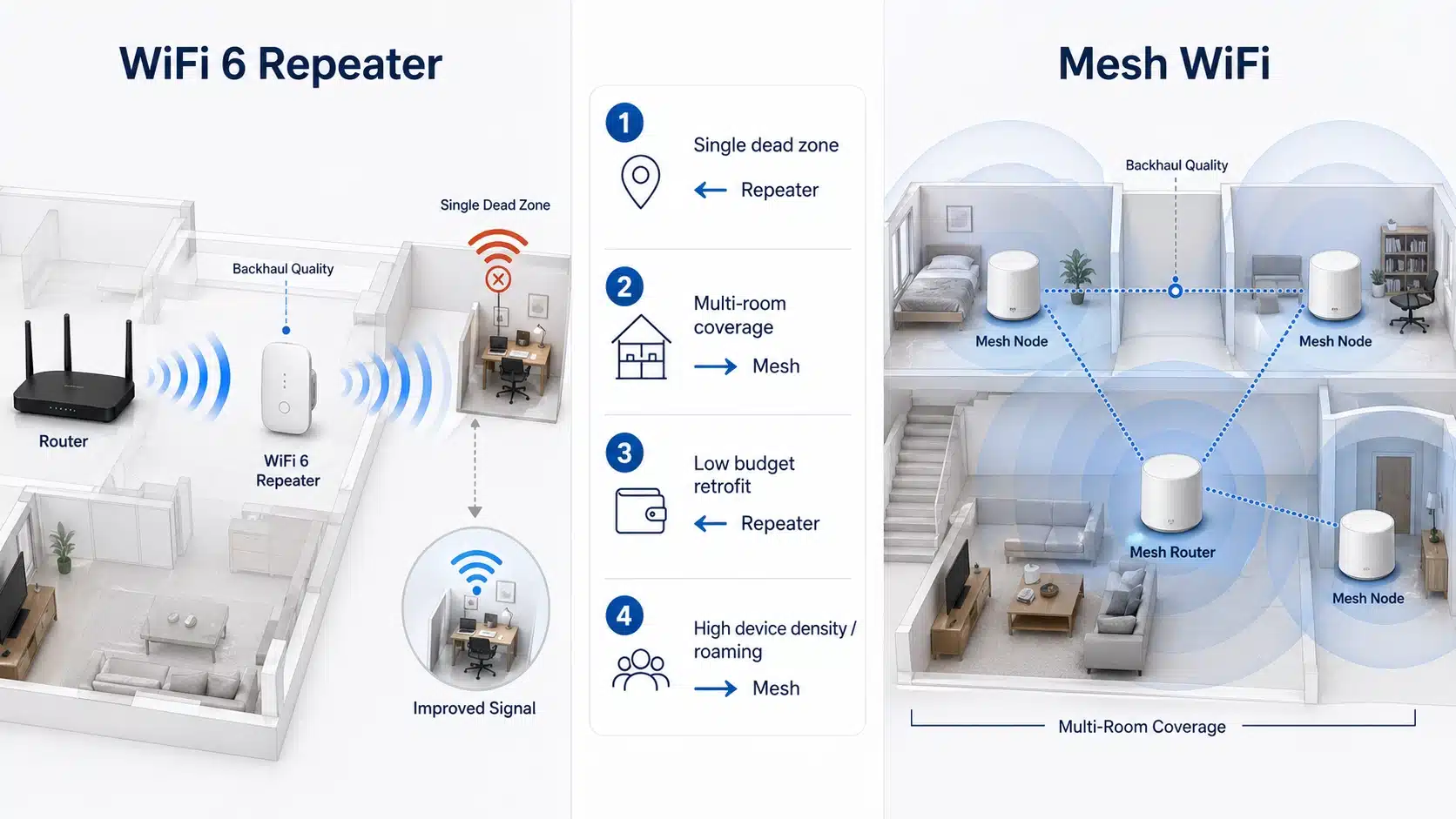
Once compatibility basics are clear, the next question is whether a repeater is the right solution at all. In many cases it is. In others, a mesh system or a wired access point is the better long-term fix.
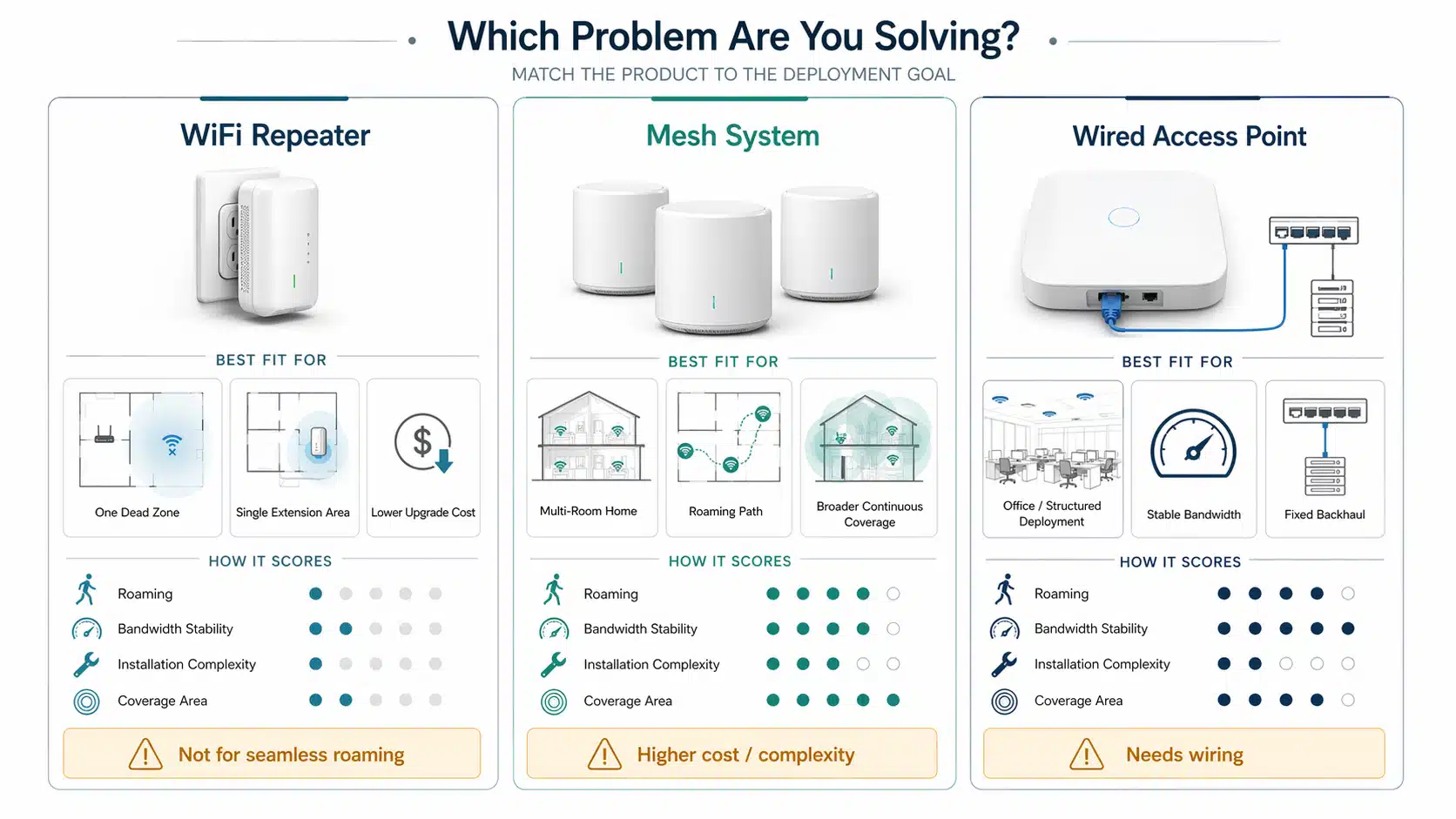
Core conclusion: compatibility alone should not decide architecture.
A repeater is often the right answer for one or two weak zones. Mesh makes more sense when the real requirement is smoother roaming across a larger multi-room layout. A wired AP is stronger when stable throughput matters more than installation convenience.
| Option | Best for | Main limitation |
|---|---|---|
| WiFi repeater | Fast coverage improvement without rewiring | Performance depends heavily on upstream signal quality |
| Mesh system | Larger homes and more seamless roaming | Higher cost and stronger ecosystem dependence |
| Wired AP | Stable coverage where Ethernet is available | Needs cable path and more installation effort |
If that comparison is your real decision point, read WiFi repeater vs mesh WiFi next. If you are still evaluating products, you can also browse our WiFi repeaters range or go directly to our WiFi 6 repeaters page.
Buyer checklist before you blame compatibility
5 things to check
- Confirm the router’s actual generation and band support, not just the ISP package name.
- Check whether the repeater is linking on 2.4 GHz, 5 GHz, or both.
- Review router security settings if setup fails, especially on newer WPA3-capable networks.
- Move the repeater closer to the router and test again before judging performance.
- Ask whether you are solving a small dead zone, a larger roaming problem, or a bandwidth bottleneck that really needs mesh or wired AP architecture.
Security settings deserve special attention. Some setup failures are not really radio failures. They come from security-mode behavior, transition-mode settings, or policy mismatch. For newer security environments, Cisco’s WPA3 guidance is a useful reference, especially when you need to understand why a modern network and an older client or setup path may behave differently.
FAQ
Can a WiFi 6 repeater work with a WiFi 5 router?
Yes. In most normal deployments, a WiFi 6 repeater can work with a WiFi 5 router. The repeated connection is still limited by the router side and by the quality of the backhaul link, so you should expect compatibility first and full WiFi 6-class performance only when both sides support it and the signal path is strong.
Will a WiFi 6 repeater work with an old 2.4 GHz router?
Sometimes yes, but the result is much more limited. Coverage may improve, but speed, stability, and overall experience can remain modest if the network is still relying on a weak or congested legacy 2.4 GHz link.
Why does my repeater connect but still feel slow?
The most common reasons are weak placement, same-band repeating loss, an old router, or a crowded band. A repeater can only extend the quality of the signal it receives. If the upstream signal is poor, the repeated result will also be poor.
Does a WiFi 6 repeater automatically give me WiFi 6 speed everywhere?
No. WiFi 6 performance depends on the whole link, including the router, the repeater, the client device, the active band, and the signal environment. A newer repeater improves options, but it does not override the limits of an older network.
Can security settings cause a compatibility problem?
Yes. Some setup failures come from WPA2 or WPA3 settings, mixed security modes, or firmware behavior rather than from pure hardware incompatibility. If pairing fails, security settings are one of the first things to verify.
When should I choose mesh or a wired AP instead of a repeater?
Choose mesh when you need broader multi-node coverage and smoother roaming. Choose a wired access point when you can run Ethernet and want more stable performance. A repeater makes the most sense when you want a simpler way to fix a smaller coverage gap without rewiring.
Final answer: a WiFi 6 repeater usually works with many routers, including many WiFi 5 and some older WiFi 4 environments. But buyers should not treat compatibility as a yes-or-no checkbox. The better question is whether the repeater can connect, remain stable, and still make sense for the network’s actual performance target.
If the main router is still reasonably capable and the goal is to improve one or two weak areas, a repeater can be a practical and cost-effective solution. If the router is already the real bottleneck, or if the project needs broader roaming coordination and more stable infrastructure, a different architecture may be the better choice. Start with the router, the environment, and the real coverage goal, then compare the right WiFi 6 repeater options accordingly.
Image titles / alt text / captions used in this article are aligned with the uploaded image set so the page can be published without further media-field rework.