How to Choose a USB WiFi Adapter for PC and Laptop: A B2B Buyer’s Guide
Choosing a USB WiFi adapter is not only about the largest speed number on the product page. For desktop PCs, laptops, office deployment, private label projects, and bulk resale, the real decision depends on WiFi standard, USB interface, antenna design, driver support, operating system compatibility, thermal stability, and packaging requirements.
This guide explains how to select a suitable USB WiFi Adapter for PC and laptop applications from both a user experience and B2B procurement perspective.
Quick Answer: Which USB WiFi Adapter Should You Choose?
For most B2B buyers, the right USB WiFi adapter should be selected by use case first, then by wireless standard, USB interface, antenna design, and driver support. Do not approve a bulk order only by checking the advertised speed class.
1. Start with the Real Application, Not the Speed Number
A USB WiFi adapter is a small device, but its performance is affected by several conditions outside the adapter itself. A desktop PC may sit under a metal desk, behind a monitor, or close to USB 3.x noise sources. A laptop may need portability, low heat, and plug-and-play driver support. A B2B buyer may need stable batches, private label packaging, and consistent driver files across thousands of units.
That is why the first question should not be “Is this an AX1800 adapter?” The better question is: “Where will this adapter be used, what router environment will it connect to, and what level of driver and stability risk can the project accept?”
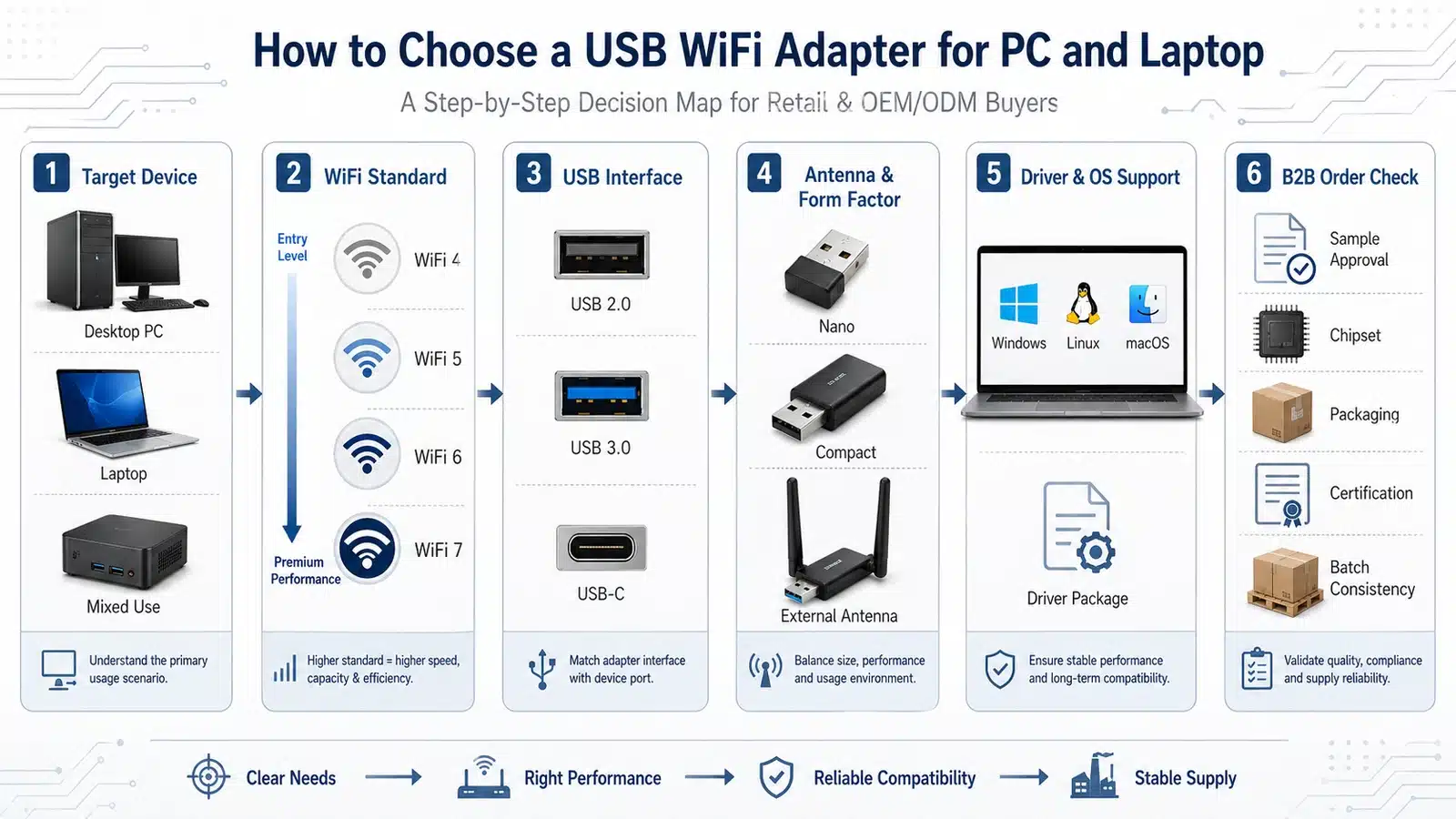
Key takeaway: The best USB WiFi adapter is not always the fastest model. It is the model that matches the device type, signal environment, operating system, and procurement requirement.
This decision map is the core structure of the article. It prevents buyers from making a common mistake: choosing by speed label first and discovering later that the adapter is too large for a laptop, too weak for a desktop PC, or difficult to deploy because of driver limitations.
Engineering note: In real projects, many USB WiFi adapter complaints are not caused by the WiFi standard itself. They often come from poor antenna placement, weak USB port position, driver mismatch, unstable heat behavior, or unclear bulk-order validation.
2. Choosing a USB WiFi Adapter for Desktop PC vs Laptop
Desktop PCs and laptops use USB WiFi adapters differently. A desktop PC usually needs better signal reception because the case may be placed far from the router, under a desk, or near metal objects. A laptop already has portability as the main value, so the external adapter should not block nearby ports or create too much heat during travel or office use.

Key takeaway: For desktop PCs, prioritize reception and antenna position. For laptops, prioritize portability, physical clearance, and operating system compatibility.
The same USB WiFi adapter may perform differently on a desktop PC and a laptop. A larger adapter with external antennas may be suitable for a fixed desktop installation, but it can be inconvenient for laptop users who move frequently or use adjacent USB ports.
What Matters Most for Desktop PCs
- External antenna or high-gain antenna structure
- Stable connection through rear USB ports or USB extension base
- Dual-band or WiFi 6 support for modern router environments
- Driver stability for office, gaming, POS, or workstation use
- Better thermal design for long working sessions
What Matters Most for Laptops
- Compact body that does not block adjacent ports
- Low heat during continuous use
- Reliable Windows, Linux, or macOS driver support where needed
- Good 5 GHz connection for office and home router use
- Low-profile design for travel and mobile work
If your product category covers both users, you may need more than one SKU. For example, a compact nano model can support laptop buyers, while a larger dual-band or WiFi 6 Adapter with external antennas can support desktop PC buyers.
3. Match the WiFi Standard with the USB Interface
USB WiFi adapters are commonly described by WiFi class, such as WiFi 4, WiFi 5, WiFi 6, or WiFi 7. These labels are useful, but they do not tell the whole story. A high wireless speed class still needs a suitable USB interface, stable driver, capable router, and clean signal environment.
For technical background, the IEEE 802.11 standard defines the wireless LAN MAC and PHY framework behind WiFi products. In procurement practice, buyers do not need to read the standard document before choosing a USB adapter, but they should understand that WiFi class, band support, chipset capability, and router compatibility must be judged together.

Key takeaway: USB 3.x is more important for higher-speed dual-band or WiFi 6 adapters, while USB 2.0 may still be acceptable for basic 2.4 GHz or lower-speed applications.
This matrix helps B2B buyers avoid two opposite mistakes: overpaying for a high-speed label in a low-speed application, or using a USB interface that limits the adapter’s actual throughput in a higher-performance SKU.
| Adapter Type | Typical Use | USB Interface Consideration | B2B Buyer Note |
|---|---|---|---|
| 2.4 GHz USB WiFi Adapter | Basic browsing, POS terminals, simple office devices | USB 2.0 is often sufficient | Useful for cost-sensitive projects, but 5 GHz support may be expected by modern users. |
| Dual-Band WiFi 5 Adapter | Office laptops, desktop PCs, general home and business use | USB 2.0 or USB 3.x depending on speed class | A balanced option for many resale and office deployment projects. |
| WiFi 6 USB Adapter | Modern routers, higher device density, stronger upgrade positioning | USB 3.x is usually preferred for higher speed classes | Suitable for product lines that need stronger marketing value and future-ready positioning. |
| WiFi 7 USB Adapter | Premium upgrade market and new-generation router environments | Higher interface and driver requirements should be confirmed | Better for advanced product portfolios, not always necessary for mainstream bulk orders. |
For many mainstream buyers, a stable dual-band adapter is more practical than an over-specified model. If your users have newer routers, denser device environments, or stronger upgrade expectations, a WiFi 6 USB adapter may be a better fit.
4. Choose the Right Form Factor and Antenna Design
Form factor directly affects both usability and wireless performance. Nano adapters are convenient for laptops, but their small size limits antenna space. Larger adapters can provide better antenna structure, but they may block adjacent USB ports. External antenna models are often better for desktop PCs, weak signal areas, or fixed installations.

Key takeaway: Smaller adapters are easier to carry, but larger adapters often provide better antenna space and better reception in difficult signal environments.
This comparison is especially important for B2B buyers building a product lineup. A single universal model may not serve every user well. A better product matrix usually includes a compact laptop model and a stronger desktop-oriented model.
| Form Factor | Main Advantage | Main Limitation | Best Fit |
|---|---|---|---|
| Nano USB WiFi Adapter | Very compact and easy to leave plugged in | Limited antenna space and weaker reception in difficult locations | Laptops, travel, basic office use |
| Compact Dual-Band Adapter | Balanced size and performance | Performance depends heavily on antenna layout and chipset | General PC and laptop applications |
| External Antenna USB Adapter | Better signal reception and adjustable antenna position | Larger body and less convenient for mobile laptop users | Desktop PCs, weak signal areas, fixed installation |
| Adapter with USB Extension Base | Allows better placement away from the PC case | Higher package cost and larger desktop footprint | Office desktops, gaming PCs, workstation environments |
If you sell both WiFi Adapters for PC & Desktop and WiFi Adapters for Laptop, form factor should not be treated as a small design detail. It is part of the actual user experience.
5. Check Driver Support Before You Check the Final Price
Driver support is one of the most important factors in USB WiFi adapter selection. A product with good hardware can still create complaints if users cannot install the driver, if the driver package is unclear, or if the adapter behaves differently across Windows, Linux, or macOS systems.
For B2B projects, driver support should be checked before bulk purchasing. This is especially important for office deployment, education equipment, industrial computers, mini PCs, POS systems, and private label distribution.
Driver Items to Confirm
- Supported Windows versions
- Linux kernel compatibility where required
- macOS support if the product will be sold to Mac users
- Driver package language and installation instructions
- Plug-and-play behavior versus manual driver installation
- Driver download method for end users
Common Driver-Related Risks
- Different chipset batches using different drivers
- Unclear model naming in driver files
- Installation failure on older systems
- Weak support for Linux or macOS users
- High after-sales pressure from non-technical buyers
- No stable download page for private label customers
If the adapter is part of a broader wireless product portfolio, consider how it connects with other categories such as WiFi Adapters, WiFi Bluetooth Adapter, and PCIe WiFi Adapters.
6. B2B Bulk Order Validation Checklist
For B2B buyers, USB WiFi adapter selection should not end at the sample quotation. Before mass order confirmation, the adapter should pass a practical validation flow covering driver, signal, thermal behavior, packaging, labeling, and batch consistency.
USB interface compliance can also affect branding and certification discussions. The USB-IF Compliance Program describes the role of testing, certification, Test ID tracking, logo licensing, and OEM arrangements. For private label or resale projects, this reference is useful when discussing certification responsibility and packaging claims with suppliers.

Key takeaway: For bulk orders, the cheapest sample is not always the lowest-risk product. Validation before mass production reduces driver complaints, return rates, and after-sales pressure.
This validation flow turns the article from a normal consumer buying guide into a B2B sourcing guide. It helps purchasing teams, distributors, system integrators, and private label buyers evaluate both the product and the supplier’s execution capability.
7. When Should You Choose USB WiFi Instead of PCIe WiFi?
USB WiFi adapters are usually better when the user needs easy installation, portability, or a simple wireless upgrade. PCIe WiFi adapters are usually better for desktop users who need stronger internal installation, better antenna routing, or higher long-term stability.
| Comparison Point | USB WiFi Adapter | PCIe WiFi Adapter |
|---|---|---|
| Installation | Easy plug-in installation | Requires opening the desktop PC case |
| Portability | Good for laptops and movable devices | Fixed inside desktop PC |
| Signal Potential | Depends on antenna design and USB placement | Often stronger with external antenna base |
| Best Use | Laptops, office PCs, temporary upgrades, resale projects | Gaming desktops, workstations, fixed PC builds |
For product planning, USB and PCIe adapters should not compete with each other directly. They serve different users. A complete WiFi adapter portfolio can include both categories, with USB models covering broad compatibility and PCIe models covering desktop performance upgrades.
FAQ: USB WiFi Adapter Selection
Is a USB WiFi adapter good for desktop PCs?
Yes. A USB WiFi adapter can be a practical upgrade for desktop PCs, especially when Ethernet wiring is not available. For desktop use, an adapter with external antennas or a USB extension base usually provides better placement and stronger reception.
Which USB WiFi adapter is best for a laptop?
For laptops, a compact dual-band USB WiFi adapter is usually the best starting point. It should support the target operating system, generate low heat, avoid blocking nearby ports, and provide stable 5 GHz connection where possible.
Do I need USB 3.0 or USB 3.x for a USB WiFi adapter?
USB 3.x is more useful for higher-speed dual-band or WiFi 6 adapters. For basic 2.4 GHz or low-speed applications, USB 2.0 may still be sufficient. The right choice depends on the adapter speed class and real application target.
Is WiFi 6 necessary for a USB WiFi adapter?
WiFi 6 is useful when the router environment is modern, the user expects higher performance, or the product needs a stronger upgrade position. For basic office or cost-sensitive projects, a stable dual-band WiFi 5 adapter may still be suitable.
Are external antenna USB WiFi adapters better?
External antenna adapters often provide better reception than nano adapters, especially for desktop PCs or weak signal areas. However, they are larger and less convenient for mobile laptop users. The best choice depends on the target device and use case.
What should B2B buyers check before bulk ordering USB WiFi adapters?
B2B buyers should check chipset consistency, driver support, OS compatibility, sample stability, thermal behavior, packaging, labeling, certification requirements, and after-sales handling before confirming bulk orders.
Need USB WiFi Adapters for Bulk Purchase or OEM/ODM Projects?
If you are sourcing USB WiFi adapters for office deployment, private label resale, system integration, retail packaging, or OEM/ODM wireless product projects, IGR can support model selection, chipset discussion, driver package review, sample validation, packaging options, labeling requirements, and bulk order planning before mass production.
You can start from our USB WiFi Adapters category page, or compare related wireless adapter options across WiFi 6 Adapters, WiFi Adapters for PC & Desktop, and WiFi Adapters for Laptop.
Discuss Your USB WiFi Adapter Project