OEM / ODM WiFi Adapters
Build WiFi adapter programs around real market demand, compatibility targets, and supply requirements. This category is for buyers who need more than a standard stock model — including private label USB adapters, PCIe desktop cards, OS-specific SKUs, WiFi + Bluetooth combinations, packaging customization, and long-term B2B supply support.
-
Need a fast-launch retail SKU? Start with USB WiFi adapters.
-
Need stronger desktop positioning? Review PCIe WiFi adapters.
-
Need combo connectivity? Check WiFi Bluetooth adapters.
-
Need custom branding, packaging, or spec direction? This page is the right starting point.
This page helps buyers compare OEM, ODM, and wholesale routes before moving into product-level selection.
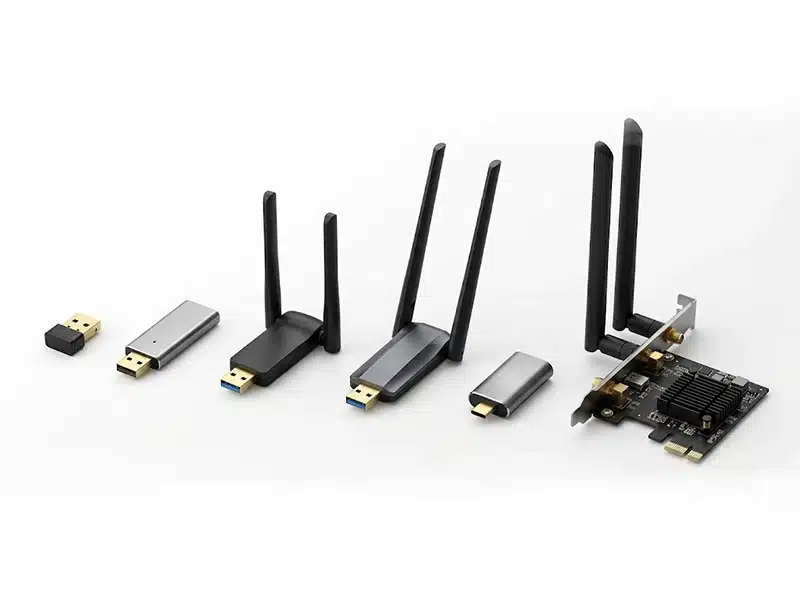
What This Category Is Actually For
OEM / ODM WiFi adapters are for buyers who need a defined product route instead of a generic stock item. This category is built for private label programs, compatibility-focused projects, and repeatable B2B supply where interface, chipset, OS support, packaging, and product positioning all matter.
Quick positioning note
This page is not for embedded WiFi modules, repeaters, CPE devices, or one-off spot purchases with no change request. It is for buyers who need clearer product definition before moving into SKU selection or inquiry.
Best Fit For
- Private-label USB WiFi adapter programs for retail or channel sales
- PCIe desktop adapter projects for gaming, office, and PC upgrade demand
- WiFi + Bluetooth combo products that need clearer market positioning
- Buyers who need packaging, labeling, logo, or bundle customization
- Projects with specific Windows, Linux, or Mac compatibility requirements
- Distributors and importers building repeat-order product lines instead of one-time buying
Not the Best Fit For
- Buyers who only want fast stock supply with no change in product direction
- Projects that should use embedded WiFi modules instead of finished adapters
- Repeater, bridge, router, or outdoor wireless deployment products
- Buyers with no target device type, no OS direction, and no interface plan
- Low-volume demand where wholesale stock models already solve the requirement
- Projects that need board-level integration rather than end-user adapter products
Common OEM / ODM WiFi Adapter Program Types
Not every adapter project starts from the same market position. Some are price-driven. Some are OS-driven. Others are built around retail convenience, desktop performance, or WiFi + Bluetooth integration.
Entry USB WiFi Adapter Programs
A practical route for low-cost projects built around basic wireless demand, starter retail SKUs, or replacement market volume.
USB AC600 / AC1200 / AC1300 Programs
A balanced category for mainstream retail and distribution, especially when buyers need a clear upgrade path without pushing too high on price.
USB WiFi 6 Adapter Programs
A stronger fit for projects that want newer positioning, cleaner WPA3 messaging, and a more current product story for modern router environments.
WiFi + Bluetooth Adapter Programs
A market-friendly direction for buyers who want a cleaner one-device solution instead of separating wireless networking and Bluetooth functions.
PCIe Desktop Adapter Programs
Better for desktop-focused projects that need stronger antenna presentation, internal installation, and a more performance-oriented market position.
Windows / Linux / Mac-Focused Programs
A valuable path for distributors serving specific device ecosystems where compatibility can decide the purchase more directly than speed claims.
What Buyers Should Actually Compare
For OEM / ODM WiFi adapter projects, platform fit matters more than headline speed. Buyers should compare the points that affect compatibility, positioning, after-sales burden, and repeat-order consistency.
| What to Compare | Why It Matters | What Buyers Should Confirm |
|---|---|---|
| Chipset platform | Driver stability, OS compatibility, and long-term maintainability start here. | Confirm chipset family, target OS versions, and real driver path before deciding packaging or positioning. |
| USB 2.0 vs USB 3.0 vs PCIe | Interface affects bandwidth ceiling, power behavior, device fit, and product class. | Match interface choice to the target device type instead of comparing only by printed speed numbers. |
| Antenna structure | Antenna size and count shape signal behavior, form factor, and product appearance. | Decide whether the project needs nano size, dual-antenna USB style, or desktop-class PCIe presentation. |
| WiFi generation and class | WiFi 4, 5, and 6 help buyers understand positioning, but they do not tell the whole story. | Check whether the adapter class really matches the router base, price band, and user expectation in the target market. |
| Bluetooth integration | Combo SKUs improve convenience, but increase validation scope and support considerations. | Confirm Bluetooth version, OS list, and whether WiFi and Bluetooth follow the same support logic. |
| OS support | For many projects, OS support is the real purchase decision point. | Use exact Windows, Linux, and Mac version scope rather than broad compatibility claims. |
| Security support | WPA2, WPA3, and related security messaging affect market acceptance. | Confirm whether the sales channel or target region expects newer security support as a baseline requirement. |
| Housing and thermal design | Compact shells look clean, but may limit antenna room and thermal headroom. | Decide whether the project is prioritizing compact size, stronger signal presentation, or a more premium visual style. |
| Branding and packaging scope | Private-label value often depends on packaging consistency, barcode logic, and shelf presentation. | Define logo method, carton language, label format, bundled accessories, and SKU naming early in the project cycle. |
| Compliance route | Regional certification expectations can affect rollout timing and channel access. | Confirm destination markets and approval requirements before final SKU rollout or volume planning. |
Where This Type Makes More Sense
OEM / ODM WiFi adapter projects make more sense when the buyer is building a repeatable product line, not just solving a one-time supply gap. This route is strongest when product definition, compatibility, and market positioning all matter.
Private-Label Online Brands
Best for brands that need a cleaner product story, custom packaging, and consistent restocking across USB WiFi, WiFi + Bluetooth, and higher-tier upgrade SKUs.
Regional Distributors and Importers
A stronger fit when the market needs different OS emphasis, different packaging language, or a clearer good-better-best product ladder across multiple adapter classes.
Desktop Upgrade and PC Accessory Channels
A practical route for buyers who need to separate USB convenience models from PCIe desktop performance models and present each one with the right market positioning.
Compatibility-Focused Product Lines
Useful for projects where Windows, Linux, or Mac compatibility affects sales conversion, after-sales workload, or channel acceptance more directly than headline speed claims.
OEM / ODM WiFi Adapter FAQ
These are the questions buyers usually need answered before moving from category browsing into project discussion, sample evaluation, or bulk inquiry.