WiFi Adapters for Windows
WiFi adapters for Windows are wireless adapters designed for Windows-based laptops and desktops. This category is not only about wireless speed. For real deployment, buyers need to compare Windows version support, driver path, interface type, antenna design, and whether Bluetooth works on the same OS version.
-
USB and PCIe options for different Windows devices
-
Covers entry-level, dual-band, WiFi 6, and higher-performance models
-
Useful for retail, OEM, project supply, and replacement orders
-
Bluetooth support should be checked separately from WiFi support
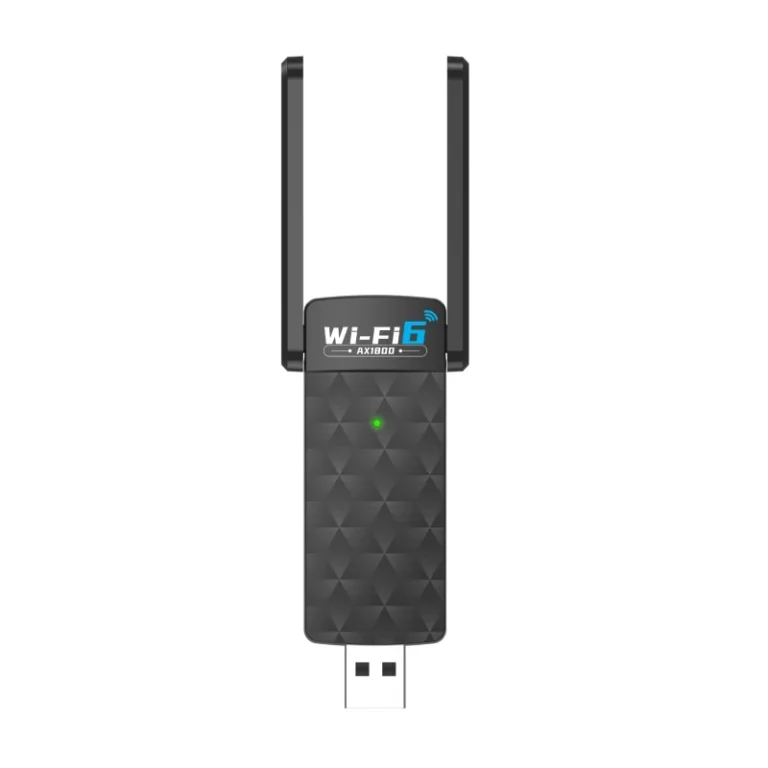
What Makes a WiFi Adapter a “Windows” Model
“WiFi adapter for Windows” is mainly a compatibility label, not a wireless standard. In actual product selection, buyers should focus on the Windows version range, driver path, interface type, Bluetooth dependency, and how the adapter will be deployed on real PCs or laptops.
This page is about compatibility first, not speed first.
Buyers often search “WiFi adapter for Windows” because they want a model that fits a specific Windows device environment. The real decision is not only whether the adapter is fast enough, but whether it will install cleanly, match the target OS, and avoid support problems after delivery.
OS range matters
Win10/11 support is not the same as Win7/10/11 or legacy Windows support. Buyers should define the real target OS first.
Driver path matters
Driver-free deployment can reduce installation effort, but buyers still need to check the chipset and support logic behind the product.
Bluetooth is separate
A combo model may support WiFi on one Windows range, while Bluetooth works only on newer Windows versions.
Interface changes the use case
USB models fit fast upgrades and mobile deployment. PCIe models fit desktop towers that need a more fixed hardware solution.
Common WiFi Adapter for Windows Buyers
This category should be organized by Windows deployment logic, not just by headline speed. The goal is to help buyers quickly understand which product level fits their device type, OS range, and expected performance.
Entry USB WiFi 4 Adapters
Built for basic Windows connectivity, low-cost replacement, and simple 2.4GHz network access.
Compact USB WiFi 5 Adapters
A practical step up from entry-level models for buyers who want dual-band support without moving to a larger form factor.
Mainstream USB WiFi 5 AC1200 / AC1300
These models make more sense when buyers want stronger everyday throughput, more stable reception, and a clearer upgrade from older adapters.
USB WiFi 6 / 6E Adapters
Positioned for newer Windows environments where buyers want a more current wireless standard and better long-term product positioning.
WiFi + Bluetooth Combo Models
These adapters combine wireless networking with Bluetooth for Windows users who also connect keyboards, mice, speakers, or headsets.
PCIe WiFi Adapters for Desktop
PCIe remains the better fit when the target device is a desktop tower and the buyer prefers a more fixed internal hardware solution.
What Buyers Should Actually Compare
Speed class alone is not enough. For Windows adapter projects, buyers should compare installation risk, OS compatibility, interface fit, and long-term supply consistency.
Where Windows WiFi Adapters Make More Sense
This category works best when the project is centered on Windows-based devices, practical deployment, and clear compatibility positioning for end users or channel buyers.
Windows desktop upgrade projects
A strong fit for office PCs and desktop towers that need wireless access without replacing the whole system or opening a complex hardware upgrade path.
Laptop connectivity upgrades
Useful when buyers want an external wireless upgrade for Windows laptops and prefer a simple add-on product rather than internal disassembly.
Retail and private-label Windows accessory lines
This category is easier to position in retail or OEM packaging when the core audience is clearly Windows-based and compatibility language needs to be simple.
Bluetooth combo demand on Windows PCs
These models make more sense when users also connect keyboards, mice, speakers, or headsets and want WiFi plus Bluetooth in one product.
- Windows-focused channel buyers
- Office and education desktop replacement orders
- OEM accessory programs for PC users
- Products that need clear compatibility messaging
- The buyer mainly serves Linux-first users
- The project is Mac-focused rather than Windows-focused
- The requirement is embedded integration, not end-device adapters
- The main goal is enterprise roaming, not client-side connectivity
Frequently Asked Questions
These questions are written for real buyers, not for filler content. The goal is to help visitors understand compatibility, selection boundaries, and procurement risks before they move deeper into the product range.
Is “WiFi adapter for Windows” a real technical category?
Do all Windows WiFi adapters support Bluetooth on the same Windows versions?
Is driver-free support enough to choose a model?
When should a buyer choose PCIe instead of USB?
Are WiFi 6 or 6E adapters always the better choice for Windows users?
What should OEM or bulk buyers confirm first?
OEM / ODM / Bulk Support
For USB WiFi adapter projects, supply support should be judged by confirmation points rather than broad factory claims. Buyers usually need stable product direction, clear compatibility scope, and controllable packaging and delivery details before scaling an order.
Product Direction Confirmation
Before sampling or bulk order, buyers should confirm wireless standard, USB interface type, antenna structure, Bluetooth option, and target market positioning. Similar-looking USB adapters may not represent the same internal direction.
Chipset and Compatibility Check
In USB adapter projects, chipset direction affects driver path, operating system support, and long-term consistency. This should be aligned early, especially for Windows, Linux, Mac, or market-specific support requirements.
Appearance and Packaging Customization
Bulk projects often require more than the hardware itself. Housing color, logo treatment, packaging style, barcode label, user manual language, and accessory combination should all be confirmed as part of the supply plan.
Sample-to-Mass Consistency
One of the most important checkpoints is whether the approved sample matches the final bulk configuration. Buyers should confirm chipset direction, shell version, interface, accessory set, and labeling consistency before scale-up.
Retail, Channel, and Project Fit
USB WiFi adapters are used differently across retail, replacement, bundle, and project channels. Product mix, packaging structure, and feature direction should match the actual selling environment rather than follow one generic SKU logic.
Delivery and Order Control
After technical direction is locked, buyers should also confirm lead time, packing format, carton marking, version tracking, and batch control. These details become more important as order size grows.