PCIe WiFi Adapters
PCIe WiFi adapters are internal wireless upgrade cards designed mainly for desktop PCs, gaming towers, workstations, and custom system builds. Compared with compact USB adapters, they usually offer a more stable internal connection, larger external antennas, and a cleaner long-term desktop setup. For B2B buyers, this category is often chosen for desktop upgrade kits, branded PC accessories, and wireless + Bluetooth combo projects.
-
Built for desktop internal installation
-
Usually better suited to fixed PC deployments than portable use
-
Commonly selected for WiFi + Bluetooth combo upgrades
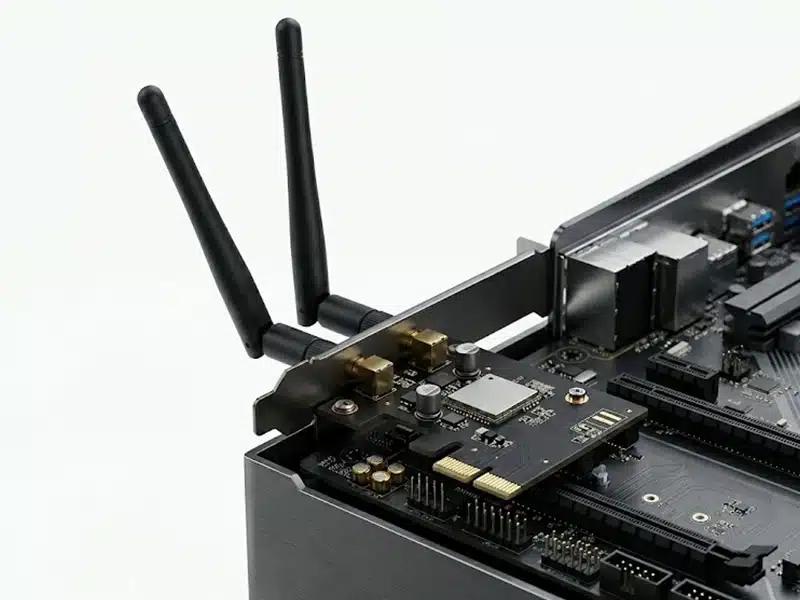
What Defines a PCIe WiFi Adapter
This category is mainly defined by internal desktop installation, rear antenna architecture, and a more structured upgrade path for desktop systems. In the market, “PCIe WiFi adapter,” “PCIe WiFi card,” and “internal desktop WiFi card” are often used in similar ways, but the engineering meaning is more specific.
Internal Desktop Form Factor
PCIe WiFi adapters are installed inside the desktop chassis rather than connected as external USB peripherals. They are primarily intended for PC motherboards with available PCIe slots.
External Antenna Architecture
Many PCIe models use rear-mounted or cabled external antennas, which gives better placement flexibility in fixed desktop environments than compact dongle-style solutions.
Often Combined with Bluetooth
In this category, WiFi + Bluetooth combo products are common because desktop users often want one internal upgrade for both network access and wireless peripherals.
More Structured than Plug-and-Play
This type is usually selected for stable desktop deployment, product bundling, or long-term system use rather than fast temporary installation across multiple devices.
Common PCIe WiFi Adapter Directions
This category is best organized by product direction rather than by overly broad marketing labels. That makes the page clearer for desktop upgrade buyers, channel partners, and OEM projects.
Entry Desktop Upgrade Cards
These models are chosen when the main goal is to add basic wireless connectivity to desktop systems that originally shipped without built-in WiFi.
WiFi + Bluetooth Combo Cards
This is one of the most practical directions for desktop upgrades, especially when the user also needs wireless keyboard, mouse, headset, or controller connectivity.
Performance-Oriented Desktop Cards
These products are positioned for stronger desktop use cases, where antenna size, placement flexibility, and a more integrated internal upgrade matter more than portability.
Newer-Generation Platform Cards
As product lines expand, buyers may look for WiFi 6, WiFi 6E, or WiFi 7 PCIe models for newer router environments, higher-capacity networks, or premium desktop configurations.
What Buyers Should Actually Compare
For PCIe WiFi adapters, the most important decision points are not only headline speed numbers. Platform fit, antenna layout, Bluetooth direction, and operating system scope usually matter more in real desktop deployment.
| What to Compare | Why It Matters |
|---|---|
| Wireless standard | WiFi 5, WiFi 6, WiFi 6E, and WiFi 7 should not be treated as the same category level. They fit different router environments and product tiers. |
| Chipset platform | Chipset choice affects driver direction, stability expectations, operating system support, and long-term project consistency. |
| PCIe slot compatibility | Buyers should confirm motherboard fit, chassis space, bracket type, and installation constraints before scaling the model into bulk purchase. |
| Antenna design | Antenna count, gain, and placement influence real desktop usability, especially when the PC is under a desk, near walls, or close to metal surfaces. |
| Bluetooth integration | Bluetooth matters when desktop users also need wireless peripherals. Version level alone is not enough; practical use and platform support should be checked too. |
| OS support | “Supports Windows” is too broad. Buyers should confirm exact target systems, deployment range, and whether Linux support is required in the project scope. |
| Thermal and mechanical structure | Internal cards work inside closed chassis environments, so stable mounting, mechanical design, and long-term hardware consistency are important. |
| Packaging and accessory set | Antenna accessories, brackets, manuals, labels, and packaging format all affect end-user deployment experience and channel efficiency. |
Where PCIe WiFi Adapters Make More Sense
This category is strongest when the project involves fixed desktop systems, internal installation preference, and a more structured wireless upgrade path than external dongle-style adapters.
Desktop Upgrade Projects
Suitable when the desktop originally ships without built-in WiFi and the buyer wants a more integrated internal solution.
Gaming Tower Builds
A common choice for fixed desktop systems where antenna positioning and a cleaner overall installation are preferred.
Workstations and Creator PCs
Fits better in long-term workstation environments where internal installation and stable desktop positioning both matter.
B2B Desktop Accessory Supply
A practical category for channel supply, branded accessory programs, desktop refresh bundles, and upgrade-focused product lines.
This Type Is Less Suitable When
The project needs portability, fast external connection, frequent device switching, or laptop-oriented deployment. In those cases, USB WiFi adapters are usually the more accurate category.
PCIe WiFi Adapter FAQ
These are the questions buyers most often need answered before they continue to product pages, comparison pages, or OEM inquiry.