WiFi Adapters for PC & Desktop
Explore WiFi adapters for PC and desktop systems, including USB and PCIe options. Compare interface, antenna design, wireless standard, Bluetooth support, and OEM or bulk supply factors.
-
USB models for faster rollout and simpler replacement
-
PCIe models for internal desktop installations
-
Dual-band, WiFi 6, and WiFi 6E options for newer networks
-
Bluetooth and driver support should be checked before bulk purchase
For most office desktops and quick deployment projects, USB is the easier starting point.
For fixed internal builds, PCIe is often the cleaner hardware path.
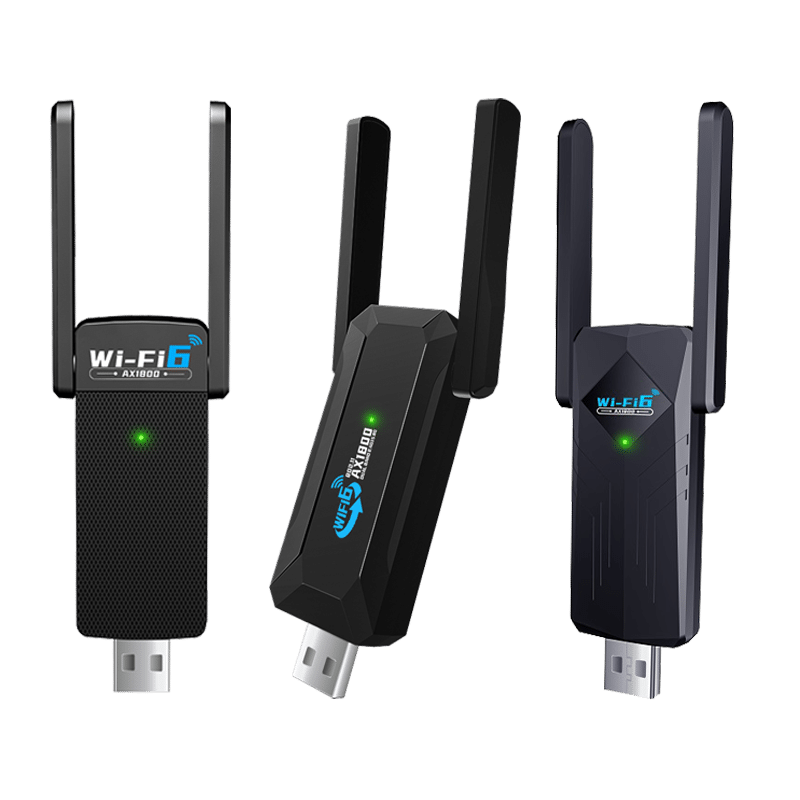
Desktop WiFi adapters add wireless connectivity to PCs that do not have built-in WiFi, use older wireless standards, or need a more flexible upgrade path. In this category, buyers usually compare USB and PCIe solutions, antenna design, Bluetooth integration, and operating system support more carefully than headline speed alone.
Choose the route that fits the desktop build, not just the speed label.
What Makes This Category Different
Desktop adapter selection is usually driven by installation logic, antenna positioning, and operating system compatibility rather than marketing speed labels alone.
Built around desktop installation logic
This category is less about portability and more about installation method, antenna position, chassis space, and long-term desktop use.
USB and PCIe are not interchangeable in every project
USB is easier to deploy and replace. PCIe is more integrated, but requires an internal slot and installation access inside the desktop.
Market wording is broad, engineering selection is specific
“PC WiFi adapter” is a buyer search term. Actual selection depends on interface, wireless standard, antenna design, Bluetooth requirement, and OS compatibility.
Common Product Types in This Category
Desktop buyers usually compare installation method, antenna layout, and connectivity level first, then move into wireless class and Bluetooth requirements.
Basic USB WiFi Adapters
Entry-level 2.4GHz models are mainly used for simple desktop connectivity, light office tasks, and cost-sensitive replacement projects.
Compact Dual-Band USB Adapters
AC-class USB models are common where buyers need 2.4GHz and 5GHz support without opening the PC chassis.
USB 3.0 Desktop Adapters with External Antennas
These are more suitable for desktops that need better signal placement, higher throughput, or more stable use in larger office spaces.
WiFi + Bluetooth Desktop Adapters
These models are useful when one device is expected to handle both wireless networking and Bluetooth peripherals such as keyboards, headsets, or controllers.
PCIe Desktop WiFi Adapters
PCIe models are more aligned with internal desktop builds where buyers prefer a fixed hardware installation rather than an external USB solution.
What Buyers Should Actually Compare
For desktop adapter projects, installation method, antenna layout, and OS support often matter more than marketing speed labels alone.
| What to Compare | Why It Matters | What Buyers Should Watch |
|---|---|---|
| Interface type | USB and PCIe affect installation method, maintenance, and upgrade path. | Choose USB for easier deployment. Choose PCIe for internal desktop builds. |
| USB generation or bus path | Interface bandwidth can limit higher wireless classes in real use. | High-spec adapters should not be paired with weak interface paths without review. |
| Antenna design | Signal quality often depends on antenna position more than headline speed. | External, higher-gain, or adjustable antennas are often better for desktop use. |
| Wireless standard | WiFi 4, 5, 6, and 6E define different performance ceilings and network suitability. | Match the adapter class to the router class and actual use case. |
| Bluetooth integration | Combined WiFi + Bluetooth models reduce extra ports and simplify desktop setup. | Check Bluetooth version, software package, and target OS support. |
| OS compatibility | Driver support is still a real purchase risk in desktop projects. | Confirm Windows, Linux, or Mac support before ordering. |
| Security support | WPA2 and WPA3 support affect network compatibility and deployment readiness. | Verify required encryption modes before volume purchase. |
| Mechanical fit | Not every desktop project accepts the same size, slot, or antenna layout. | Check rear-port clearance, internal slot availability, and antenna space. |
Where This Type Makes More Sense
This category is most useful where desktop systems need flexible wireless upgrades without changing the entire hardware platform.
Office desktop upgrades
A practical fit for office PCs that need wireless access without replacing the whole system.
Desktop builds without onboard WiFi
Useful for tower PCs, workstations, and custom desktop builds where wireless is missing or outdated.
Projects that also need Bluetooth
A better fit when buyers want one adapter for WiFi plus common desktop peripherals.
Bulk deployment with simple installation
USB desktop adapters are often easier to roll out across multiple systems with fewer hardware changes.
OEM / ODM / Bulk Supply Support
For desktop adapter projects, bulk buyers usually need more than a speed label. Chipset stability, driver policy, antenna configuration, Bluetooth version, packaging format, and revision consistency should all be confirmed before volume purchase.
Chipset and platform confirmation
Lock the chipset solution before mass order, especially for projects with Windows or Linux compatibility requirements.
Interface and housing selection
Confirm whether the project is better served by compact USB models, high-gain desktop USB models, or PCIe internal cards.
Bluetooth requirement review
If the adapter is expected to handle Bluetooth peripherals, confirm version, software package, and target OS support in advance.
Packaging and branding options
Check label content, barcode rules, manual language, carton marking, and private label requirements before production.
Batch consistency and revision control
For repeat orders, buyers should confirm hardware revision policy, driver package continuity, and model naming consistency.
FAQ
Short answers for the questions desktop buyers most often compare before moving to product pages or RFQ.