WiFi Adapter Modules
WiFi Adapter Modules are designed for products that need to join an existing wireless network through a host platform. This category is mainly for OEM devices with an onboard CPU, operating system, and defined hardware interface such as USB, SDIO, or PCIe. It fits projects where wireless client connectivity must be integrated into the device itself. It is not the right category for products whose main function is signal extension or repeater deployment.
Choose by host interface, driver path, and integration method.
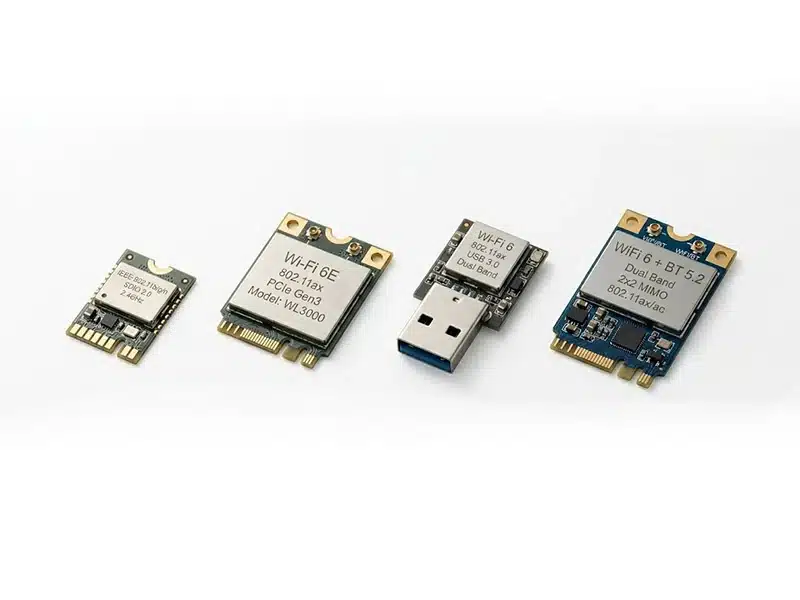
What a WiFi Adapter Modules Adds to a Host Device
A WiFi Adapter Module is used when the host platform already exists, but wireless client connectivity still needs to be added at board level. In OEM projects, the goal is usually not to create a repeater function, but to give the device a stable way to join an existing WLAN through a defined hardware interface.
It adds practical WLAN access to the host device without forcing a full RF redesign from the ground up.
Wireless Client Connectivity
It allows the host device to join an existing WiFi network for cloud access, local communication, software updates, configuration, or data transfer.
Defined Host-Side Integration
It gives the project a clear integration path through USB, SDIO, or PCIe, which is often more important than headline wireless speed in embedded development.
Faster OEM RF Path
It helps shorten development risk by starting from a module-based WLAN platform instead of building the entire wireless section from zero at product level.
Use This Category When
- The device needs to connect to an existing WiFi network.
- The host platform already has a CPU, OS, and interface path.
- The project needs controllable board-level wireless integration.
- Driver support, antenna layout, and certification planning matter.
Not Built to Solve
- Signal extension as the product’s main role.
- Dedicated repeater or relay-oriented network behavior.
- Finished consumer plug-and-play adapter retail use.
- Coverage redistribution as the core deployment task.
USB / SDIO / PCIe Adapter Module Paths
In embedded WiFi projects, the first real decision is often the host interface rather than the wireless standard. These three integration paths lead to different board constraints, software workloads, and performance expectations.
USB Adapter Modules
A practical route for embedded platforms that already have stable USB host support and need a faster integration path.
SDIO Adapter Modules
A compact embedded route for projects where board space, low-power direction, and tighter system integration are part of the requirement.
PCIe Adapter Modules
A stronger option for host platforms that can support a heavier interface path and need a cleaner route toward higher throughput classes.
What OEM Buyers Must Verify Before Selection
In WiFi Adapter Module projects, datasheet speed is only one small part of the decision. The real selection work happens where host architecture, software path, antenna design, and production readiness come together.
The safer module is usually the one that creates fewer integration variables.
A strong specification looks good on paper, but OEM projects are usually decided by whether the module fits the host board, software stack, RF structure, and certification path with manageable engineering risk.
Host Compatibility
The module must match the platform before any performance claim becomes meaningful.
Driver and OS Support
Many OEM delays come from BSP, driver maintenance, or version mismatch rather than RF hardware itself.
Antenna Architecture
Real wireless behavior depends heavily on antenna structure, placement, cable path, and final enclosure condition.
Specification Relevance
Higher generation or bigger headline rate is not automatically the better engineering choice.
Certification Path
Compliance planning often becomes a hidden project risk when it is left until late development stages.
Power, Thermal, and Throughput Boundaries
Stable field performance depends on sustained operation, not only lab-side peak values.
WiFi Repeater Module vs WiFi Adapter Module
These two module categories are related, but they are not meant for the same product role. The key difference is whether the device only needs WiFi access or must also relay wireless signals.
WiFi Repeater Module
WiFi Repeater Modules are used when a product must receive and retransmit wireless signals as part of a repeater, extender, or relay design.
- Supports repeater-oriented wireless behavior
- Best for relay and extension products
- Suitable for repeater-focused OEM development
WiFi Adapter Module
WiFi Adapter Modules are used when a device needs standard wireless client connectivity to join an existing network.
- Adds WiFi access to the host device
- Best for client-side wireless connection
- Not intended for relay or extension behavior
Choose a repeater module when relay behavior is part of the product itself. Choose an adapter module when the device only needs to connect to WiFi as a client.
Frequently Asked Questions
These are the questions OEM buyers usually need answered before moving from category review to module shortlist and integration discussion.
01
Is a WiFi Adapter Module the same as a USB WiFi dongle?
No. A WiFi Adapter Module is generally intended for board-level OEM integration into a host device. A USB WiFi dongle is usually a finished retail accessory for end-user plug-and-play use. The engineering focus is different in interface planning, antenna arrangement, driver integration, and product-level validation.
02
What should be checked first when selecting a WiFi Adapter Module?
The first check is usually the host interface path. USB, SDIO, and PCIe create different integration workloads, board constraints, and performance ceilings. If the interface path does not match the host platform, later improvements in WiFi generation or rate class will not solve the main engineering problem.
03
Does WiFi 6 automatically make a module the better OEM choice?
Not necessarily. A higher wireless generation does not automatically create a better project result. The real decision still depends on host support, driver maturity, antenna conditions, thermal margin, certification path, and whether the application can actually benefit from that class in the final device.
04
Why is actual throughput often much lower than the rated speed?
Rated speed is a theoretical link-layer figure under defined conditions. Actual throughput is shaped by host limitations, protocol overhead, antenna efficiency, interference, channel width, distance, and deployment environment. In embedded products, enclosure structure and board layout can also reduce real wireless performance.
05
When is an external antenna route better than an onboard antenna?
An external antenna route is often more suitable when the enclosure is dense, metallic, shielded, wall-mounted, or installed in a direction that makes onboard radiation efficiency harder to control. Onboard antennas can still be effective, but only when mechanical space, placement, and surrounding materials are properly managed.
06
When should a project move from Adapter Module review to Repeater Module review?
The category should change when the final device is no longer only joining WiFi, but is expected to participate in signal extension, relay behavior, or coverage redistribution. In that case, the project is no longer centered on host-side wireless access only, and the system role becomes repeater-oriented.